Main Menu - View
The View menu on the main menu bar contains commands for you to
modify the camera position and angle and switch to different camera views.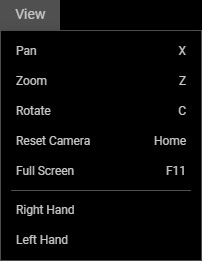
 Pan (X)
Pans the camera.
Zoom (Z)
Zooms in and out of the scene.
Rotate (C)
Rotates the camera around the scene based on the center of the 3D viewport.
Center (Home)
Snaps the camera to view the character in the front-center view.
Full Screen (F11)
Hides the left and right panel to obtain the largest perspective.
Right Hand
Switches to the right hand view for adjusting the finger joints of the right hand.
Left Hand
Switches to the left hand view for adjusting the finger joints of the left hand.
