Modes for ActorMIXER and ActorMIXER Pro - Editing and Mixing
The ActorMIXER has two modes, Editing and Mixing. The Editing mode is used for choosing package, wheel, swapping mixer assets, switching to morph / skin libraries, randomizing the shape of the character and so on; while the Mixing mode can only be used to blend or morph the shape of the character.
Notice that in this section, only the differences are listed and described for these two modes. In addition, the targets within the wheel will shrink in Mixing mode, creating more space for the Green Blend Point to travel within.
Editing Mode
There are actions can be done in the Editing mode, which are excluded in the Mixing mode.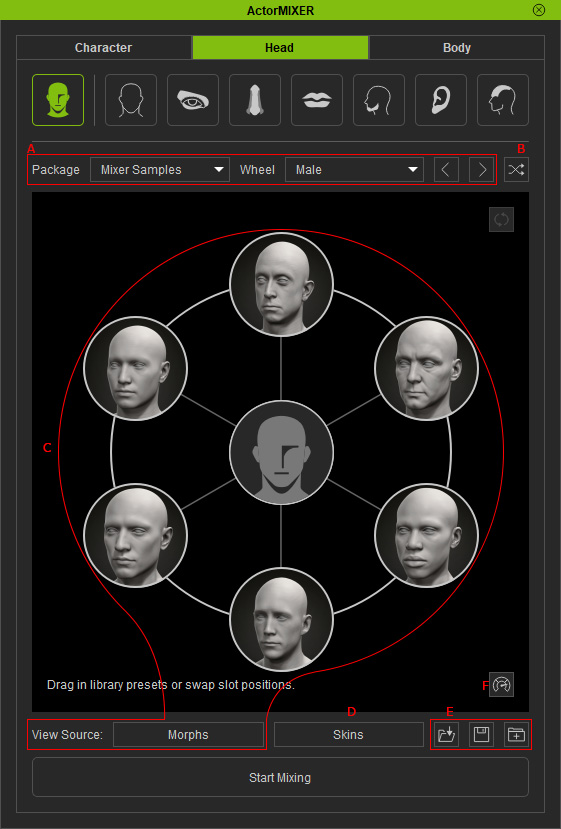
- Choosing Package and Wheels.
- Randomizing Shapes of Characters.
- Swapping Assets with / without Morph Templates.
- Designating Skin.
- Loading / Saving Wheels and Packing Wheels.
- Optimizing Performance.
Mixing Mode
In the Mixing mode, you can only switch to different parts of the character and morph the character's shape by dragging the green Blend Point near the assets.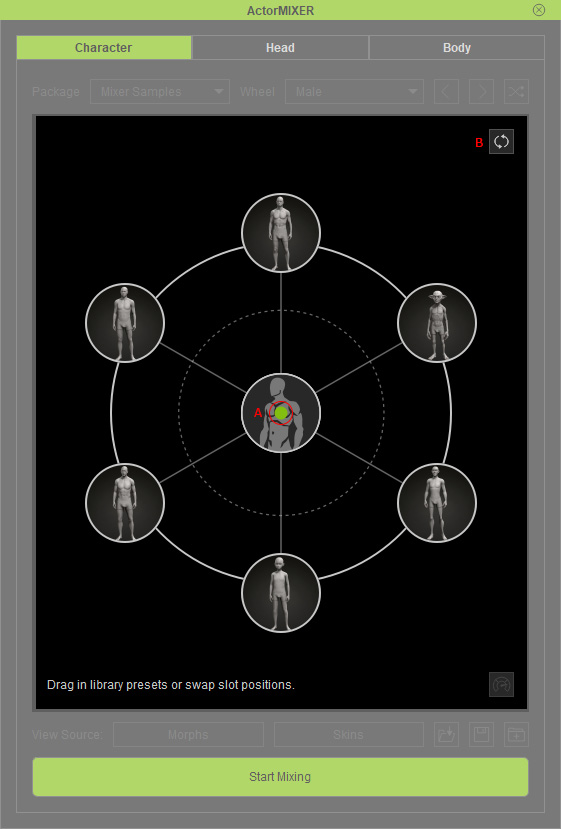
- Green Blend Point: You can drag the blend point toward all directions in the range of the wheel near the assets to re-shape the character.
- Reset: Centers the blend point to initialize the character's shape when the mixing mode starts.
