Eyes and Eye Occlusion (New for v1.24)
Eye Shader consists of different anatomical parts of the eye including the iris, sclera, limbus, and pupil, (each with adjustable features and parameters). You can flexibly change color, brightness, roughness, specular, depth, refraction level, etc. In the Auto Setup 1.24 update, Eye Shader & Eye Occlusion shader blueprints were enhanced to achieve a more realistic look on the eyes. Adjustments were made towards sclera brightness, iris brightness, and eye occlusion shadow.
You can create eye variations by adjusting the settings.
 Eye and Eye Occlusion Shader comparison between Auto Setup 1.23 and Auto Setup 1.24 with minor adjustments

- Enhanced the brightness of the iris to strengthen the visual effect.

- Adjusted the strength of the Eye Occlusion to brighten up the eyes and strengthen translucency.

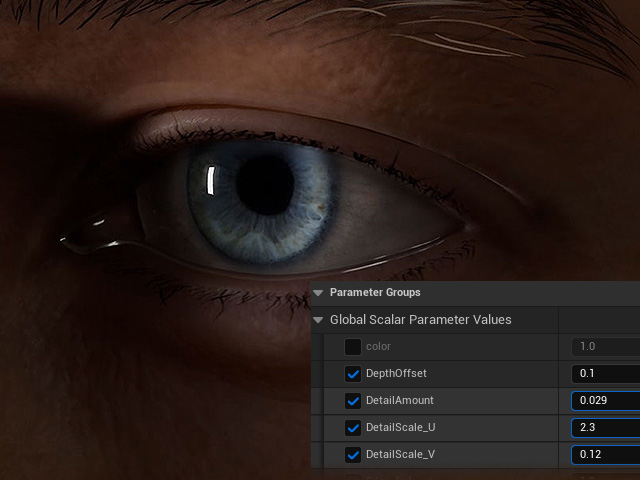
- Eye Occlusion Shader > Depth Offset – You might have noticed a small mesh that is protruding out from the corner of Kevin’s eyes, use Depth Offset to push it back in.

- Eye Occlusion Shader > Shadow 1 and 2 Strength – Decrease shadow strength on Eye Occlusion (both Shadow 1 Strength and Shadow 2 Strength).

- Eye Cornea Shader > Iris Color and Iris Brightness – Increase the brightness and saturation of the iris

- Eye Cornea Shader > Sclera Brightness – Increase brightness on the sclera, and as a bonus adjustment, change Sclera UV Radius to enlarge the eyes.

- Eye Occlusion Shader > Bottom Blur Range / Blur Strength / Expand – Adjust Blur Strength to get rid of unwanted gaps.

- Eye Cornea Shader > Iris UV Radius – Notice there’s an unnatural ring around the iris; adjust Iris UV Radius to fix it.

- Eye Cornea Shader > Iris Depth Scale – Adjust iris depth.

- Eye Cornea Shader > Iris Inner Scale – Adjust iris inner color range.

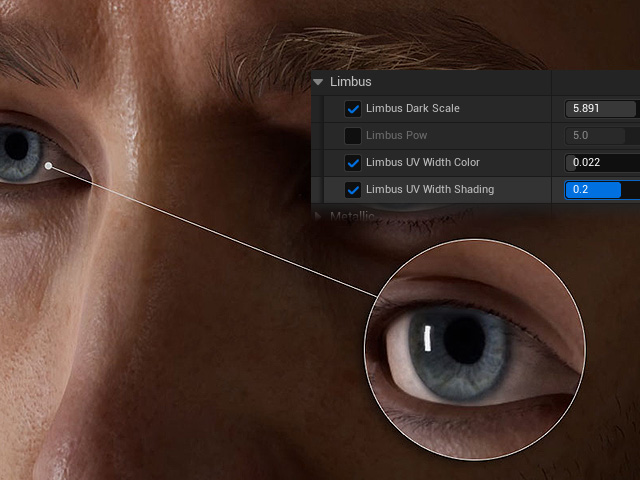
- Eye Shader > Lumbus: Adjust the properties of the ring around the iris.
- Limbus Dark Scale: Adjust iris outline thickness.
- Limbus UV Width Color: Adjust limbus boundary expand and contract.
- Limbus UV Width Shading (Eye Cornea Shader): Adjust light shading to increase and decrease refractiveness.
- Eye Cornea Shader > Eye Shadow Radius – Adjust from a range of flesh colors for the eye corner.

- Eye Cornea Shader > Sclera Brightness – Revisit this parameter to tone down the brightness of the sclera.

- Eye Shader > Iris Color – Return to tone down the brightness of the iris.

- TearLine Shader > Specular and Metallic – Adjust to your liking.

- TearLine Shader > Detail Adjustments – Add normals on the tear line to increase detail.