Using Embedded Puppet Stage Contents (New in version 5.3)
After you have installed or updated to Cartoon Animator 5.3, a new "Puppet Stage" pack will appear under the "Project" folder. Double-click on the pakc folder to install it.
After the pack is installed, double-click on it to open the pack.
*You can visit the Reallusion website to purchase more content for Puppet Stage. Especially, Puppet Stage - Anime Puppet and Puppet Stage - Cartoon Puppet
* All characters and props in the Puppet Stage pack are ready to be animated by the Puppet Stage panel.
- Puppet Stage:

- The Puppet Stage projects feature complete settings for the characters.
- When you apply the template, the Puppet Stage panel will automatically open.
- You can instantly start to puppet for previewing, recording or even live streaming.
- Actor:

- There are three human characters and one free-bone character, all ready to animate with the Puppet Stage panel
- Animation: You can drag and drop the template from the sub-library to the Puppet Stage panel.

- The 2D Motion contains motion clips for character's body movements.
- The Perform templates contains both body and facial expressions.
- The Prop Motion contains animations for the props in this pack.
- The Puppet Stage Profile templates can be drag and drop to the Puppet Stage panel for overall replacements, including the animation cards and the settings.
- Scene:

- Contains a template with regular props that compose the entire scene.
- Props:

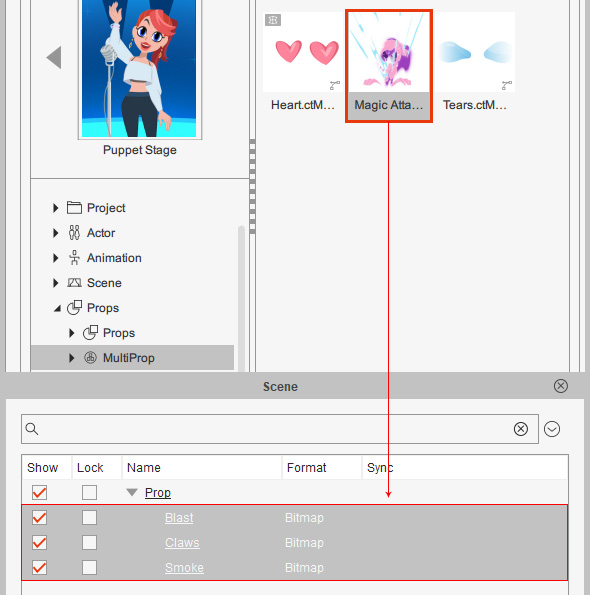
- There two sub-libraries: "Props" and "MultProp".
- The props sub-library contains templates with only one prop, it can has one or more sprite elements.

- The MultiProp sub-library contains templates with multiple props. They can be animated individually or together using the Puppet Stage panel.