Face Fitting
Face Fitting, the final step of Image Processing, assists you to set wireframes to frame up the facial features as precise as possible since when the actor starts to talk and move, the settings of the wireframe affect the result most.
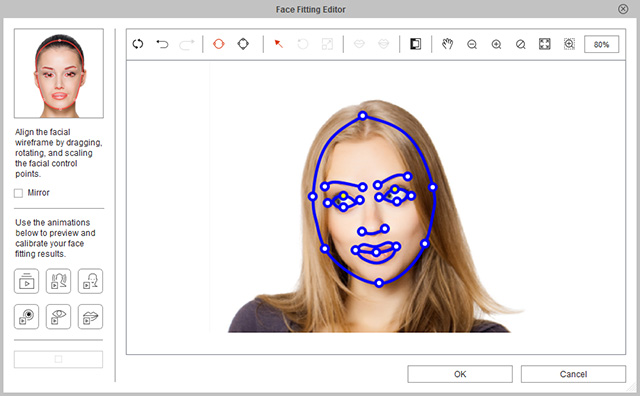
You can adjust the fitting result of a morph-base head by clicking the Face-Fitting Editor button on the Create Morph-based Head toolbar.

 Basic Tools
-
 Wireframe Color:
Click this button and cycle through different wire frame colors.
This can be used if both the original image and the wire frames
colors are the same color, as it would make it difficult to view and make corrections.
Wireframe Color:
Click this button and cycle through different wire frame colors.
This can be used if both the original image and the wire frames
colors are the same color, as it would make it difficult to view and make corrections.
-
 Select:
Click this button to pick and move components of the wire frame.
This button is pressed and activated by default.
Select:
Click this button to pick and move components of the wire frame.
This button is pressed and activated by default.
- You may move the wires or the individual wire frame points.
- Move the frame points get a wire shape more suited to the face contours.
- To move multiple points simultaneously, hold the Ctrl key and click the desired control points. The selected control points will turn red. Release the Ctrl key and then move the points to the desired location.
-
 Rotate:
Select a wire frame or multiple frame points and click this button to rotate them.
Rotate:
Select a wire frame or multiple frame points and click this button to rotate them.
-
 Scale:
Select a wire frame or multiple frame points and click this button to resize them.
Scale:
Select a wire frame or multiple frame points and click this button to resize them.
Zoom Tools
-
 Pan:
After you zoom in the image, you may press down this button and drag the image in order
to pan to the desired area for modifying.
Pan:
After you zoom in the image, you may press down this button and drag the image in order
to pan to the desired area for modifying.
-
 Zoom Out:
Click this button to zoom out the image for observing more of the image.
Zoom Out:
Click this button to zoom out the image for observing more of the image.
-
 Zoom In:
Click this button to zoom in the image for better observing and
modifying the details.
Zoom In:
Click this button to zoom in the image for better observing and
modifying the details.
-
 Actual Size:
Click this button so the image will be shown in its original resolution.
Actual Size:
Click this button so the image will be shown in its original resolution.
-
 Fit to Window:
Click this button so that the image will be zoom in or zoom out in order to
just fit into the preview window.
Fit to Window:
Click this button so that the image will be zoom in or zoom out in order to
just fit into the preview window.
-
 Drag and Zoom:
Press down this button and drag a rectangle around the desired area of the image
in order to zoom in to the area for better observing and modifying the details.
Drag and Zoom:
Press down this button and drag a rectangle around the desired area of the image
in order to zoom in to the area for better observing and modifying the details.
Previewing with Calibration Buttons
- s
Click the Calibration buttons to play back
a short script intended for calibration.
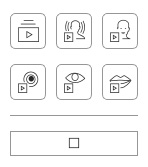
- Click the Stop button to stop the playback.
