Clothing Layers Settings (before CC 5.2)
The Cloth Layer Settings panel is used to manually arrange clothing layers, set garment layer numbers, run collision and auto-hide meshes.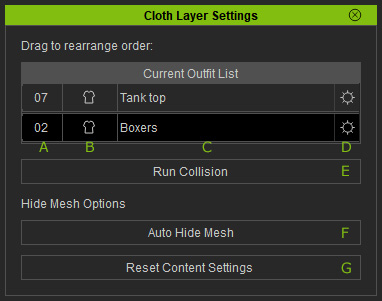
- Layer Number: The layer numbers the clothes are given.
- Type: The types of the clothes. It can be Cloth, Gloves or Shoes.
- Name: The names of the clothes.
- Collision Order: Click this button to assign the cloth to desired layer.
- Run Collision: Click this button to see the customized layering result.
- Auto Hide Mesh: This feature works on the meshes of the entire character, including the body and clothes instead of individual layer of meshes.
- Reset Content Settings: Click this button to forgo the results of the Auto Hide Mesh feature and retrieve the original mesh visibility settings embedded by its creator.
