FBX Advanced Settings - General Section
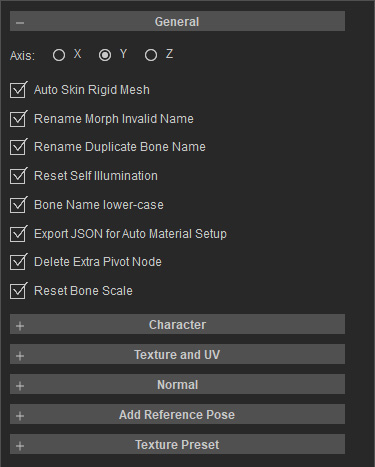
- Axis: Determines the primary axis direction during export. This directly impacts the model's orientation and rotation baseline in external DCC tools such as Maya, Unreal, and Unity. Incorrect alignment typically results in characters being imported horizontally (lying flat), horizontally inverted, or rotated 90 degrees.
- Auto Skin Rigid Mesh: Automatically skins unskinned rigid meshes to their corresponding bones. This is commonly applied to assets like eyeballs, teeth, accessories, and attachments to prevent them from remaining static during skeletal animation.
- Rename Morph Invalid Name: Automatically corrects morph / blendshape names that violate external software naming conventions. The primary purpose is to prevent import failures or forced renaming by DCC tools, which frequently occur due to spaces, special characters, or invalid leading characters.
- Rename Duplicate Bone Name: Automatically renames duplicate bone names to avoid importer errors caused by name conflicts. This is critical for engines and tools that strictly enforce unique skeletal nomenclature, such as Maya, MotionBuilder, and Unreal Engine.
- Reset Self Illumination: Resets material self-illumination values. This prevents issues where models appear excessively bright or washed out in external software, and ensures CC-internal glow effects do not interfere with external pipelines.
- Bone Name lower-case: Unifies all bone names into lowercase to mitigate mapping issues caused by case-sensitive pipelines. This optimization improves the reliability of custom scripts, retargeting processes, and engine imports.
- Export JSON for Auto Material Setup: Outputs a supplementary JSON file for Auto Setup. Since the FBX format cannot fully preserve all material parameters, this JSON bridges the gap by storing shader types, texture paths, and specific material attributes to facilitate automated material generation.
- Delete Extra Pivot Node: Removes redundant pivot nodes. When characters or accessories undergo pivot adjustments within CC or iClone, unnecessary nodes may be generated upon export. Enabling this option ensures a cleaner hierarchy in external tools.
- Reset Bone Scale: Resets all bone scale values to 1,1,1. This prevents external DCC tools or game engines from interpreting CC/iClone internal bone scaling as actual transform values, which can lead to incorrect proportions or animation distortion.
