Baking Textures for the CC5 HD Character
After completing the wrapping process, click Create CC Actor to generate the CC5 HD character. The Bake Textures panel then opens, allowing you to define how textures are generated for the new character. The panel provides four settings: Diffuse, Normal, PBR Textures, and Texture Size.
The panel provides four settings: Diffuse, Normal, PBR Textures, and Texture Size.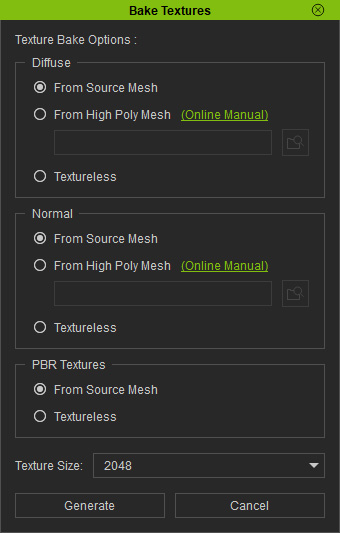
Diffuse
Select how the Diffuse texture is generated:
- From Source Mesh: Uses the Diffuse texture from the imported source mesh and bakes it onto the CC5 HD character.
- From High Poly Mesh: Uses the texture from a selected high-poly mesh and bakes it onto the CC5 HD character.
- Textureless: Creates the CC5 HD character without a Diffuse texture.
Normal
Select how the Normal texture is generated:
- From Source Mesh: Uses the Normal texture from the imported source mesh and bakes it onto the CC5 HD character.
- From High Poly Mesh: Uses the Normal texture from a selected high-poly mesh and bakes it onto the CC5 HD character.
- Textureless: Creates the CC5 HD character without a Normal texture.
PBR Textures
Select how the PBR textures are generated:
- From Source Mesh: Uses the PBR textures from the imported source mesh and bakes them onto the CC5 HD character.
- Textureless: Creates the CC5 HD character without PBR textures.
Texture Size
Select the output texture resolution from 256 to 8192. A higher resolution provides more texture detail but increases texture memory usage.
