Body Wrap Panel
The Body Wrap panel provides the tools and settings required to conform a CC5 standard character to the shape of an external model. The wrapping process is organized into three main steps: Detect Joints, Align Points, and Refine Mesh.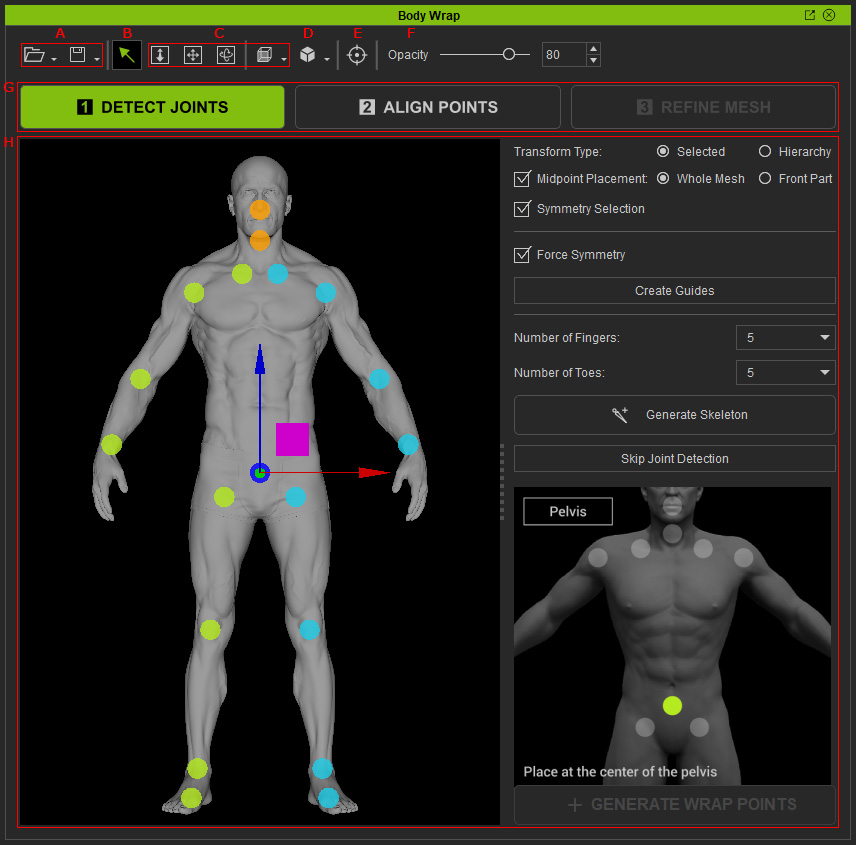
|
Feature |
Description |
|
|
A |
Save / Load Wrap Project |
Saves or loads the Body Wrap settings as a project, allowing the wrapping setup to be saved and resumed later. |
|
B |
Select Tool |
Selects guide points, bones, and alignment points in the viewport. |
|
C |
Camera Tools |
Provides controls for panning, orbiting, and zooming the preview camera, as well as switching between different camera perspectives. |
|
D |
Object Display |
Switches between different object display modes, including Normal, Vertex Color, Wireframe, Wireframe on Shade (White), and Wireframe on Shade (Black). |
|
E |
Orbit Around Surface Click Point |
Sets the clicked surface, bone, or guide point as the center of camera orbiting. |
|
F |
Opacity |
Adjusts the opacity of the guide points or bones in the DETECT JOINTS step, or the CC5 HD character in the REFINE MESH step. |
|
G |
Step Switch |
Switches between the three main Body Wrap steps: Detect Joints, Align Points, and Refine Mesh. |
|
H |
Settings |
Displays the settings and controls specific to the currently selected Body Wrap step. |
