Using Voice Morph
The voice for the animated actor depends on the audio source of the script. If you create the script by importing a WAV file, or by recording with the sound recorder, then the actor's voice is the voice from the original audio source. You may choose a synthetic voice for the actor if you use the text-to-speech converter to create a script from plain text. However, you may also apply artificial voice effects to the voice for additional effects.
 Using Voice Morph
To use voice morph, click the Voice Morph  button in the Timeline.
The Voice Morph panel will then open.
button in the Timeline.
The Voice Morph panel will then open.
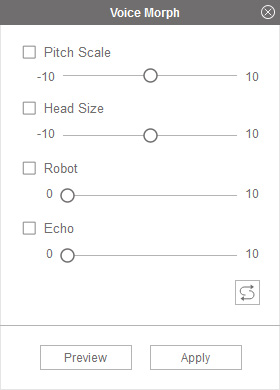
Follow these steps to create voice effects:
- Optionally select the desired voice effects to be used in the script.
- Check the Pitch Scale checkbox and move the corresponding slider to specify the pitch of the voice.
- Check the Head Size checkbox and move the corresponding slider to adjust the resonance frequencies.
- Check the Robot checkbox and move the corresponding slider to add a robotic voice effect.
- Check the Echo checkbox and move the corresponding slider to add an echo effect.
- Click the Preview button to play the script and preview the voice effect.
- Click the Apply button when done.