Exporting (New for 2.1)
CrazyTalk Animator now offers the convenient feature of exporting your
project into multimedia formats that are compatible with a wide range
of devices. For instance, you can now convert your work to an AVI
file with DVD and HD quality.
You can also convert it into sequenced image (BMP/JPG/TGA/PNG) files to broadcast on a web server.
Click the
 Export button on the Project Tool Bar to access the Export Settings panel.
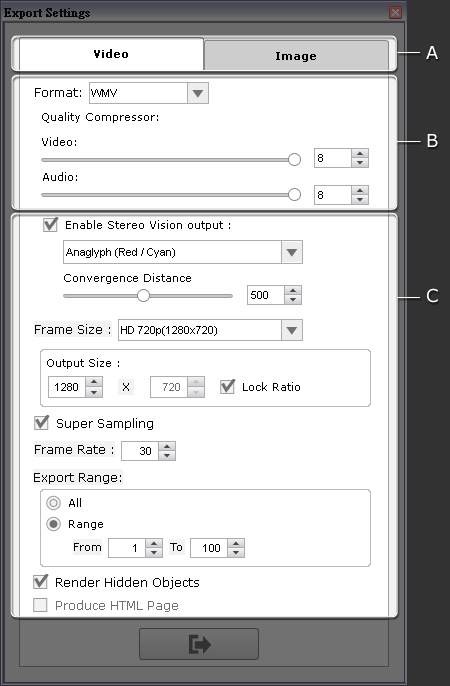
A. Media Types
B. Format and Quality
In this section, you may choose the image, video and audio quality output.
-
Utilize the Format drop-down list to decide the format of the exported media.
-
Drag the Video and/or Audio sliders to set the quality of the
exported media.
-
Determine if you want to export the entire project or just one image.
You may press F10 to preview the output image of the current frame.

|
Note:
PC:
-
By default, the export format is WMV;
however if you want to further edit the exported video with an external video editor,
then please choose AVI RAW data for lossless post production;
this maintains color fidelity for high quality production.
-
For more information about PopVideo, please refer to the
popVideo Converter Online Help.
-
If you wish to export as a popVideo with transparent background,
then please remember to
set the background as a solid color.
-
If you want to export into a WMV file format,
then you will need to first download and install the WMVEncoder9
from the Microsoft website.
Mac:
-
The supported video formats are MOV and WAV.
|
C. General Settings
In this section you may set projects as 3D media and set other general settings.