Side Head Source Photo
Formats
For best results in realistic 3D head generation, use a clear and well-lit photo of the side of the head, facing 90 degrees sideways, with no obstruction to the facial features.
Supported image formats include .bmp, .jpg, .jpeg, .png, .tif, and .tiff.
Lighting
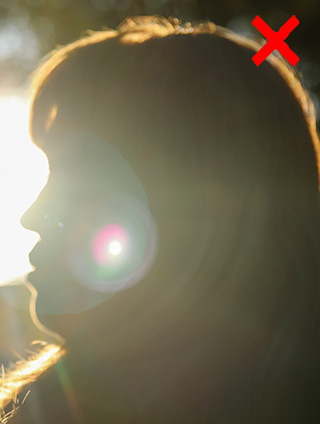
Use an image where the facial outline remains clearly visible. Strong shadows or bright highlights are acceptable as long as they do not obscure the outline of the face.
Facial Appearance
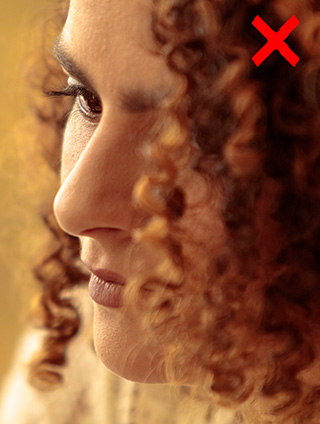
One side of the eyes corner and mouth corner should be visible.
Hairstyles covering part of the ear are supported. For more accurate control point placements, the whole ear, jawline, and the back of the head should be fully visible.
Cropping
Photos showing the entire side view of the head provide easier control pointing when refining mesh. Including the neck is optional and not required.
Head Angle
The ideal source image shows the head facing directly 90 degrees sideway, without rotation or tilt.
Correcting head orientation before loading the image into Headshot 3 can significantly improve the overall refining process.
Image Resolution
The side head source photo is fine with all resolution as long as the contour, eye and mouth are clearly visible.
Below are some image examples regarding the Side Head Source Photo:
- Lighting:
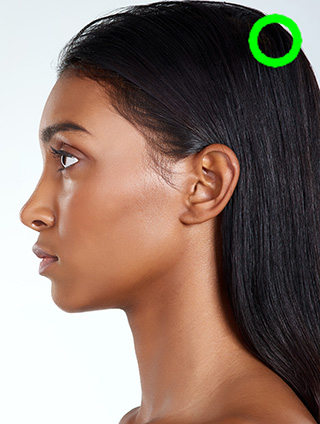
Soft Diffused Lighting
Harsh and Uneven Lighting
- Facial Appearance:
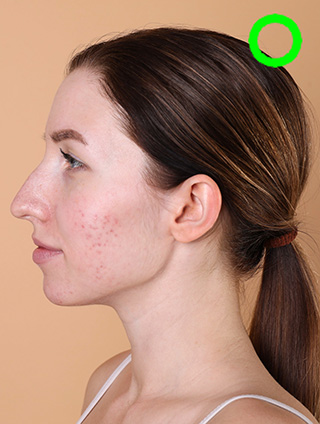
Corner of eye and mouth fully visible
The corner of eye and Mouth covered
- Head Angle:
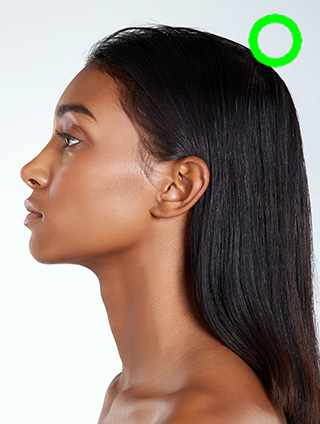
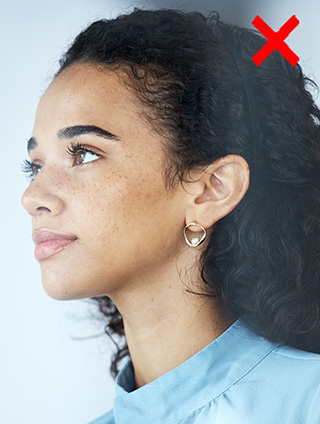
Facing Directly 90-degrees sideway
Facing Forward
