Setting Custom Neutral (New for v 1.1)
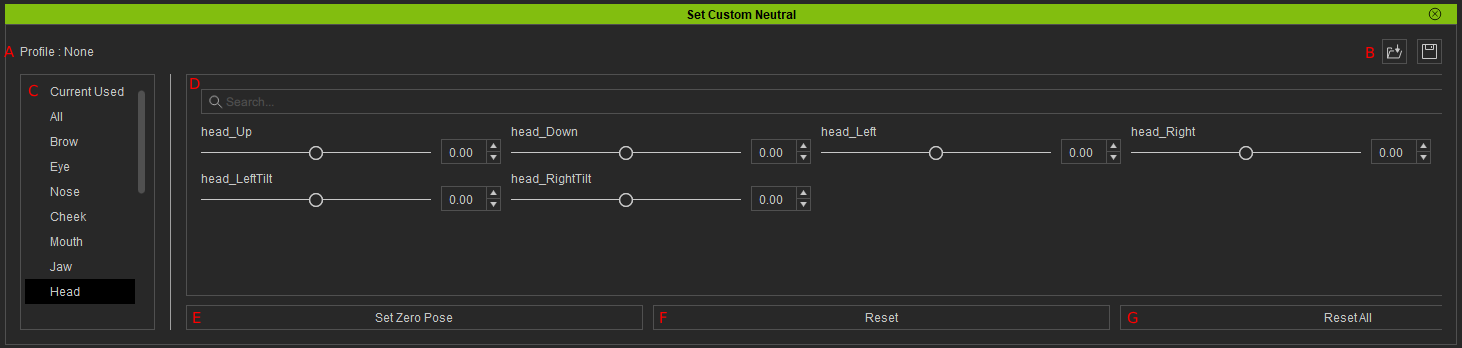
|
Name |
Function |
|
|
A |
Profile |
Name of the current profile. |
|
B |
Save / Load |
|
|
C |
Current used |
A selection of various facial components that you can fine-tune. |
|
D |
Editing Sliders |
Within the chosen facial component, you can fine-tune specific parameters using slider options.  Note: Note:
Make sure the sliders that amplify motions in opposite directions for the head orientation and the same expression morphs are not both set to positive values. Having both sliders in positive value can cause a conflict in opposing directions leading to stutters during the tracking process. For example, instead of having both ‘head_Up’ and ‘head_Down’ at 0.1, set ‘head_Up’ to 0 and ‘head_Down’ to 0.1. |
|
E |
Set Zero Pose |
Enables Motion Live to automatically calibrate your neutral zero pose by subtracting the offset numbers in the current setting. |
|
F |
Reset |
Resets the currently selected facial components back to the default value. |
|
G |
Reset All |
Resets all the facial components back to the default value. |
