Preset Prompts (v1.1)
Text to Image preset prompts make prompt creation easier and allow rapid generation of effects. You can enter custom prompts manually, but if you’re unsure where to start, preset prompts can help simplify prompt creation and enable faster generation of effects.
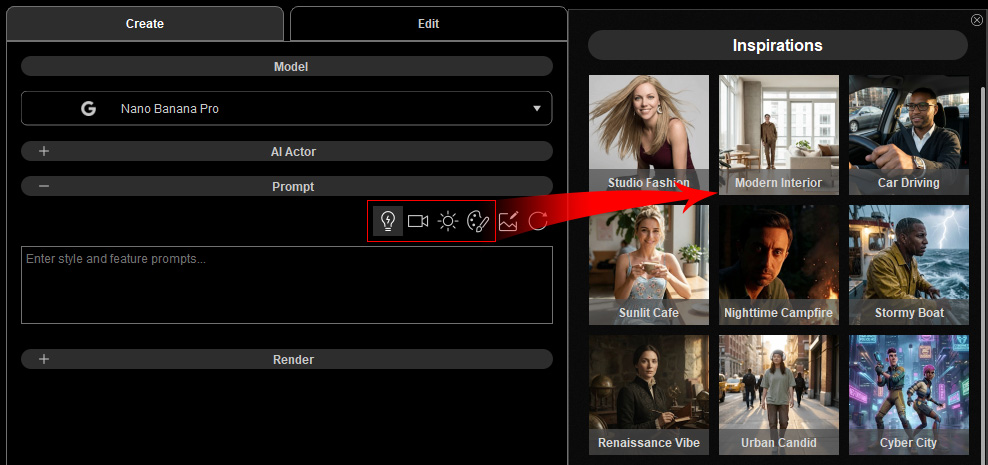
Find the preset prompts in the Prompt section of the AI Tools. Click to toggle the panel on the right.
Inserting a Preset Prompt (v1.1)
Place the cursor where you want to insert the preset prompt, then click a preset to insert its tag into the Prompt field.
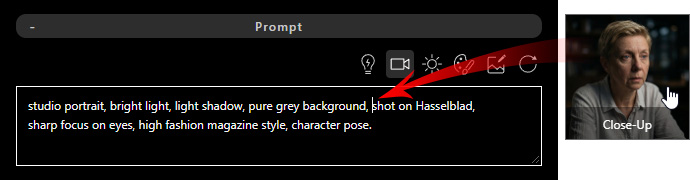
The preset prompt tag is inserted at the cursor position.

Previewing a Preset Prompt
Hover over the tag to preview its prompt content.

Deleting a Preset Prompt (v1.1)
Click X on a preset prompt tag to remove it.

Moving a Preset Prompt (v1.1)
Drag the preset prompt tag to reposition it within the description in the Prompt field.

Editing a Preset Prompt
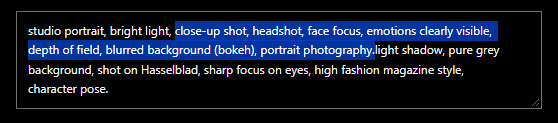
Right-click a preset tag and choose Expand Prompt to reveal and modify its content.

Modify the prompt to reach the intended rendering outcome.
Below are the types of preset prompts and the AI tools they support:
Preset Prompts | ||||||
Image Creation | V | V | -- | V | V | V |
Image Editing | V | V | -- | V | V | -- |
Video Creation | -- | -- | V | -- | -- | V |
Video Editing | -- | -- | V | -- | -- | -- |
3D to Image | V | -- | -- | V | V | V |
3D to Video | -- | -- | -- | -- | -- | -- |
Create Actor | -- | -- | -- | -- | V | -- |


