


Main Menu - Render
The Render menu on the main menu bar contains commands for rendering your project in different formats.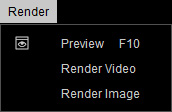
|
Preview (F10) |
This command opens the Windows Photo Viewer with the output image of the current frame. |
|
Render Video |
This command opens the Render panel for exporting your project as video files in MP4 (H.264), AVI, and WMV formats. |
|
Render Image |
This command opens the Render panel for rendering sequenced or one-frame image files in Bmp, Jpg, Tga (32-bit), and Png (32-bit) formats. |
