Viewing on YouTube
Uploading to YouTube
If your 3D stereo media is in Anaglyph format, then you may simply upload it to YouTube with any conventional method. If you would like to upload your 3D stereo media to YouTube in Side-by-Side 3D format, then follow the steps below:
- Prepare your 3D stereo media.
-
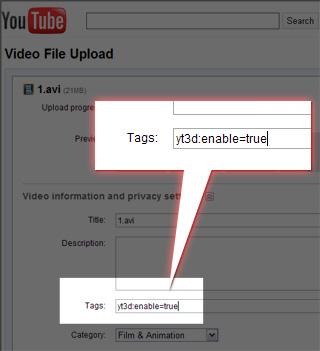
Upload it to YouTube. In the Tag section, type in "yt3d:enable=true".
-
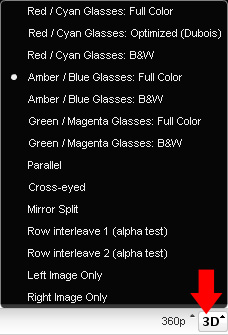
Visitors may use YouTube as a 3D player by selecting the media type in the drop-down list.
 Note:
Note:- If the 3D result is not correct, you may add "yt3d:swap=true" to fix the issue.
- If you choose any type other than two-color methods in step 3, then you must have specific display devices to perceive the correct 3D stereo effect.
