Setting blend time for different speeds (New for v. 8.4)
The blend time from different speeds to other motions, such as idle, perform, mixer motions and so on can also be customized using the Data Settings tab of MD Behavior panel.
You can find the settings in the Blend Time section.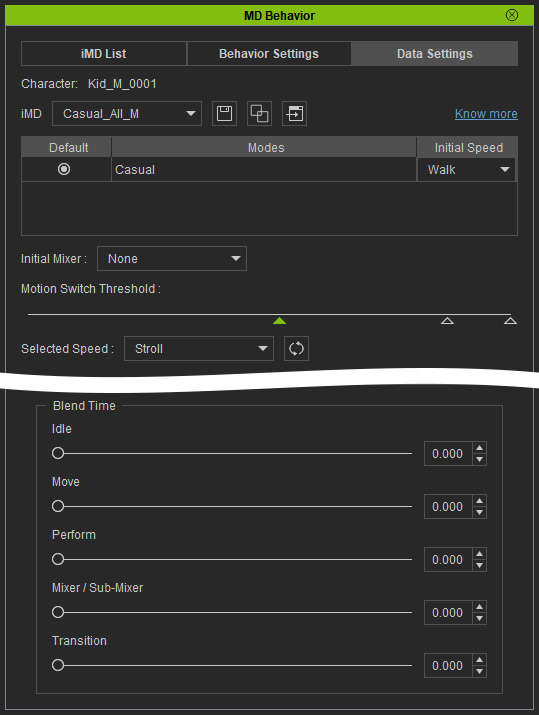
 Idle
Idle
This setting smooths out the transition by setting specific seconds from the moving / performing motions to idle motion.
|
Idle: 0.000 (sec). No blending so the motion pops from moving to idle motions. |
Idle: 2.000 (sec). Long blending time extend the transition length from walking motion to idle motion. |
Move
This setting sets the transition length between the sliced moving motions in different speed. Increase the value to smooth the walking motions.
|
Move: 0.000. The sliced moving motions have no transitions. |
Move: 2.000. |
Perform
This setting smooths out the transition by setting specific seconds from the moving / Idle motions to performing motion.
|
Perform: 0.000 (sec). The idle motion snaps to perform motion (sit and talk) in this case. |
Perform: 0.500 (sec). There is a transition motion from idle to perform motion. |
Mixer / Sub-Mixer
This setting determines the blending time for the start and end transition for Mixer / Sub-Mixer motions or for switching between Mixer / Sub-Mixer motions.
|
Mixer / Sub-Mixer: 0.000 (sec). The idle motion snaps to perform motion (sit and talk) in this case. |
Mixer / Sub-Mixer: 1.000 (sec). There is a transition motion from idle to perform motion. |
Transition
Sets the blending time between different modes.
|
Transition: 0.000 (sec). |
Transition: 2.000 (sec). |
