


Main Menu - Window
The Window menu on the main menu bar contains commands for you to
switch between different preset layouts and show/hide various toolbars and panels.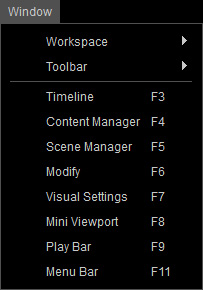
|
Workspace |
This item contains a sub-menu for applying preset layouts according to your working conditions.
|
|
Toolbar |
This item contains a sub-menu for you to show/hide the
Project,
General,
Camera,
Physics,
Modify Tools, Slider Tools and
Global Illumination toolbars. |
|
Timeline (F3) |
This command opens the Timeline panel to edit animation keys and clips for actors, props, cameras, lights, sounds, effects, etc. |
|
Content Manager (F4) |
This command opens the Content Manager panel for applying embedded and custom templates to your scene. |
|
Scene Manager (F5) |
This command opens the Scene Manager panel to view all the objects included in the current project. |
|
Modify (F6) |
This command opens the Modify panel for adjusting parameters belong to each object in the scene. |
|
Visual Settings (F7) |
This command opens the Visual Settings panel for modifying the settings of lights, shadows, Toon Shader and visual effects. |
|
Mini View-port (F8) |
This command opens the Mini View-port panel to display another mini preview window on the main preview window. |
|
Play Bar (F9) |
This command shows or hides the play bar right under the 3D view-port. |
|
Menu Bar (F11) |
This command shows or hides the main menu bar. |

 :
This command saves the current docking/floating places and visibility states of panels and toolbars as the default layout,
and you may instantly load it each time you launch the main program.
:
This command saves the current docking/floating places and visibility states of panels and toolbars as the default layout,
and you may instantly load it each time you launch the main program.

