Performance Enhancements
When you are limited by low-end computing power, and resources are in need to improve the performance of SkinGen, then you can utilize the methods described on this page.
Consider the following measures to optimize performance with SkinGen:
 Minimum Requirements
- Intel 2nd Gen Core i5 Processors
- 8 GB RAM
- Graphic Card: NVidia GeForce GTX 600 Series / AMD Radeon HD 7000 Series
- Video Memory: 2 GB RAM
- HDD, 20 GB free hard disk space for installation
- HDD, 200 GB free hard disk space for DDS cache
Recommended Requirements
- Intel 7th Gen Core i5 Processors or higher
- 16 GB RAM or higher
- Graphic Card: NVidia GeForce GTX 900 Series / AMD Radeon R7 300 Series
- Video Memory: 4 GB RAM or higher
- SSD, 20 GB free hard disk space for installation
- SSD, 200 GB free hard disk space for DDS cache
4K Editing Recommended
- Intel 10th Gen Core i5 or 8th Gen Core i7 Processors or higher
- 32 GB RAM or higher
- Graphic Card: NVidia GeForce GTX 900 Series / AMD Radeon R9 300 Series
- Video Memory: 6 GB RAM or higher
- SSD, 20 GB free hard disk space for installation
- SSD, 500 GB free hard disk space for DDS cache
- Access the Dynamic Texture Editor section in the Preference panel for showing or hiding clothing and accessories, setting low-memory warning message, and activating DDS settings when enter the SkinGen editor.
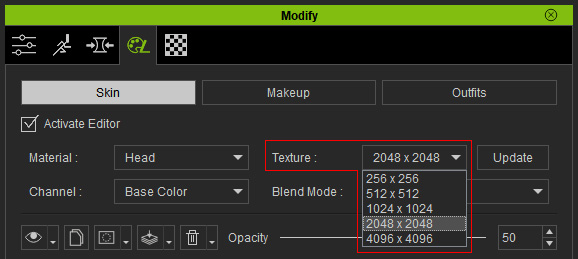
- Adjusting in Low Resolution: It is suggested you adjust layer settings in lower resolution (ex, 512 x 512) and then switch to high resolution (2048 x 2048 or 4096 x 4096) after the adjustments are done.
- Flattening or Making Static: You can flatten or make a layers static when you no longer need to adjust its settings. This will speed up the load time for Appearance Editor.


- Using Fewer Layers with Merge Feature: By merging some of the layers in the Skin Base layer, that are no longer needed for adjustment.