Modify Tools Toolbar
The Calibration and Cloth Fitting toolbar facilitates the assignment of precise poses to characters for optimal observation and ensures the best fit of clothing to their bodies.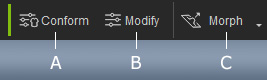
|
A |
Conforming |
Launches a panel with adjustable parameters for conforming clothing or hair to the characters. |
|
B |
Modify |
Toggles the Modify panel. |
|
C |
Sculpt Morph |
Toggles the morphing gizmo (highlighting color) and the
directly morphing method when the cursor hovers over the facial features or body parts for morphing.
|