


Global Physics Settings Section
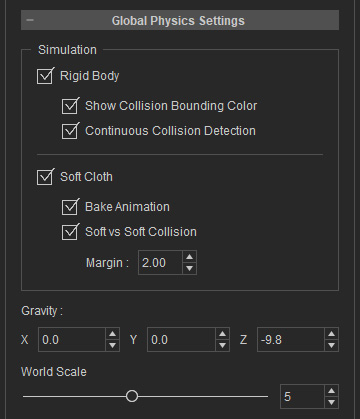
Please refer to the Setting Simulating Environments section for more information.
Rigid Body
Check these boxes to enable the Rigid Body simulation, show collision bounding color (red), and activate the collision detection for sharper and faster speed physics animation.
Soft Cloth
Check these boxes to enable the Soft Cloth simulation, bake the physics animation into the objects’ timeline, and decide the reaction range from the surface of a soft cloth during collision.
 Note:
Note:
Baking animation in Character Creator works the same way as in iClone. The animation is stored in a motion clip within the object, but it is not visible in Character Creator and cannot be edited freely. To edit the motion clip directly, you must send the object to iClone first.
Gravity
Enter values in the X, Y and Z fields to set the gravity direction. By default, the (X, Y, Z) equals to (0, 0, -9.8), which are the gravity values of the earth in Character Creator
World Scale
Drags the slider in accordance to the size of your 3D world.
The Global Physics Settings shares mostly the same settings with IClone, please refer to the Setting Simulating Environments section in IClone for more information.
