FBX Advanced Settings - Character Section
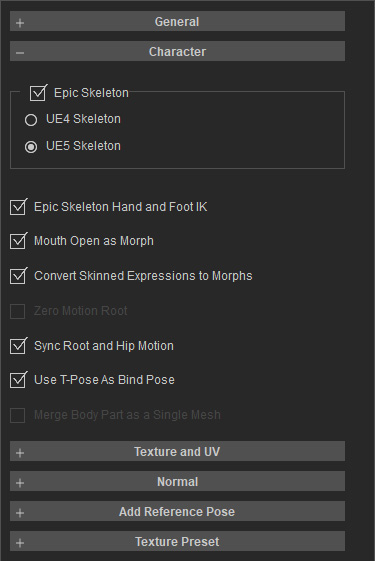
- Epic Skeleton: Enables the Unreal Epic Skeleton compatibility workflow. Rather than a simple FBX toggle, this option triggers a coordinated sequence of skeleton mapping, naming conventions, and UE-specific export logic to streamline subsequent animation retargeting.
- UE4 Skeleton: Selects the Unreal Engine 4 skeletal structure. This modifies skeletal definitions and mapping rules, and is typically utilized for pipelines targeting standard UE4 skeletons or motion assets.
- UE5 Skeleton: Selects the Unreal Engine 5 skeletal structure. Compared to the UE4 skeleton, this specifically addresses UE5-specific bone naming and structural mapping to prevent skeletal inconsistency upon import.
- Unreal Engine 4 Hand and Foot IK: Adjusts hand and foot IK mapping to align control behaviors between iClone/CC and Unreal Engine. In practice, this stabilizes animation retargeting in UE and minimizes hand/foot positional drifting.
- Mouth Open as Morph: Consolidates mouth-opening animations into a single morph target control. This allows external tools to drive mouth opening via a single blendshape axis while simultaneously driving the corresponding transformations for teeth and tongue.
- Convert Skinned Expressions to Morphs: Converts facial expressions driven by skin weights and bones into morph (blendshape) data. This optimizes facial expression editing in external software, aligning the data with standard blendshape workflows.
- Zero Motion Root: Resets the motion root transform to zero. This prevents characters from drifting away with cumulative translational data during animation playback. This setting is ideal for root-isolated or in-place animations where the root only serves as a pose controller.
- Sync Root and Hip Motion: Synchronizes the translation and rotation of the root and hip bones, ensuring root motion aligns perfectly with the character's center of mass displacement. This is vital for implementing locomotion animations (walking, running) in game engines.
- Use T Pose As Bind Pose: Enforces a standard T-pose as the bind pose instead of using the model's original bind pose. This enhances cross-platform compatibility, particularly during asset re-importing, animation retargeting, or character merging.
- Merge Body Part as a Single Mesh: Merges the separate components of the character's body into a single mesh. This simplifies mesh handling in external applications, eliminates visible seams between body parts, and streamlines multi-object management
