FBX Advanced Settings - Texture and UV Section
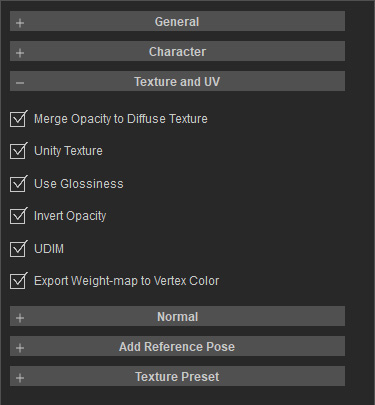
- Merge Opacity to Diffuse Texture: Packs the opacity map into the alpha channel of the diffuse texture. This is highly common in Unity pipelines, as it allows a single texture slot to carry both color and transparency data, reducing material slots and post-import setup.
- Unity Texture: Applies Unity-oriented texture export rules. This modifies the output texture channel configurations to ensure seamless material and shader mapping inside Unity.
- Use Glossiness: Processes gloss data using a glossiness / gloss map workflow. This relates to roughness / specular systems, meaning the output texture semantics favor specular highlight control over basic color mapping.
- Invert Opacity: Inverts the black-and-white logic of the opacity map. This switch corrects discrepancies for engines or material systems that define opacity inversely (e.g., where white indicates transparency and black indicates opacity).
- UDIM: Enables the UDIM texture workflow. This preserves or maps multiple UV tiles during export, making it suitable for high-resolution characters or assets requiring multi-tile texture layouts.
- Export vertex color: Includes vertex colors in the exported file. Common use cases include preserving masks, weathering data, hand-painted colors, or material blending weights for external shaders to read.
