Vicon Device Settings
Motion LIVE plugin supports Vicon mocap device, providing a complete mocap solution and multi-actor recording.
* Only iClone 8.5 and Motion LIVE 1.1 supports Vicon equipment.
* Vicon supports the following skeleton structures:
- Official skeleton VST 3.6 before Vicon Shogun Live version 3.6 or earlier.
- Official skeleton VST 3.7 of Vicon Shogun Live version 3.7.
Streaming data to iClone
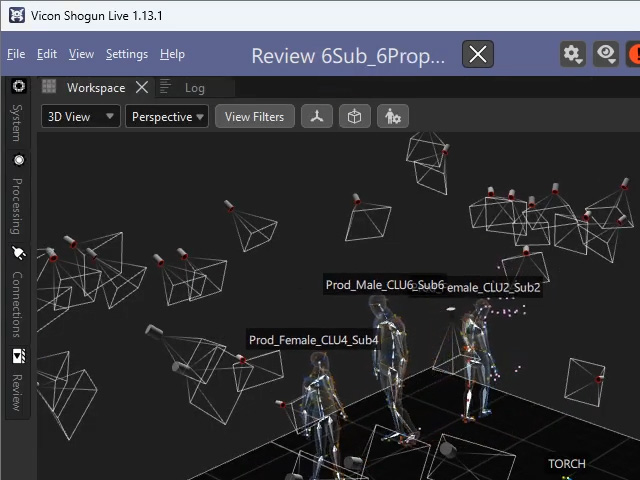
- Launch Vicon Shogun Live create a new scene,
and set up the sensors on your mocap performances.
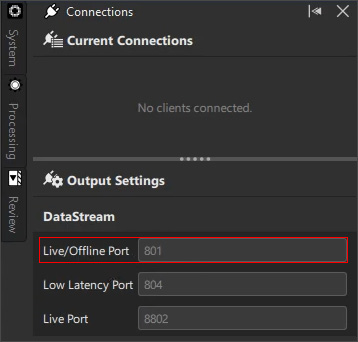
- Navigate to the Live/Offline Port field under
the DataStream section.
- To connect to Motion LIVE, add the gear to the Gear List
and type in the IP:Port value.
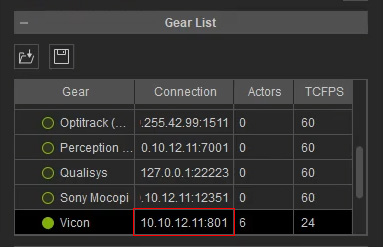
IP: The IP address of the local machine.
Port: The value found in the previous step. - Set the TCFPS value. For more information, visit Synchronizing FPS for Mocapping.
- Vicon can now stream data to iClone characters.
More About Vicon
- Standalone Program: Vicon Shogun Live
- Vicon Official Website
