Using Reference Images
You can use a reference image to guide the Stable Diffusion 1.5 or Stable Diffusion XL AI model in generating decal images. The AI will reference the style, color scheme, and composition of the image to produce decals that closely match the desired visual style.
In the Reference Image section under the AI Generation > Decal tab, either drag an image directly into the image channel or click the Load Image button to browse for one.
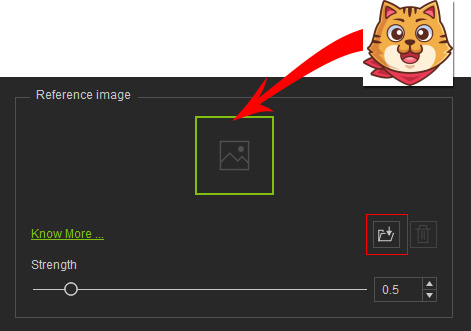
Adjust the strength of the reference image and click Generate Decal to view the AI output. A higher reference strength makes the AI output more closely follow the reference image.
- Stable Diffusion 1.5
Prompt
Cute owl with a colorful hat, sticker, outlined
Reference
Image(empty)

N/A
Strength
= 0.3Strength
= 0.5AI Output


- Stable Diffusion XL
Prompt
A cute, round cartoon owl with big, expressive eyes, wearing a stylish purple hat. Digital art, vector art, bright colors, clean lines, white background, sticker style.
Reference
Image(empty)
N/A
Strength
= 0.3Strength
= 0.5Strength
= 1.0AI Output


Reference images have a stronger influence than the prompt. When deciding which direction to go, AI image generation prioritizes the reference image based on its strength settings.
- Stable Diffusion 1.5
Prompt
(kawaii dog:1.3), sticker, stickers, cute, colorful, outlined, flat design
Reference
Image(empty)


N/A
Strength
= 0.3Strength
= 0.5AI Output


- Stable Diffusion XL
Prompt
A simple, adorable cartoon dog sitting upright, looking at the viewer. It has black outlines and minimal details. Cute, sticker art, vector illustration, white background.
Reference
Image(empty)

N/A
Strength
= 0.3Strength
= 0.5Strength
= 0.7AI Output


