User Interface Introduction for Path to Mesh panel (New for v. 8.41)
Access the Path to Mesh command from the
Modify panel: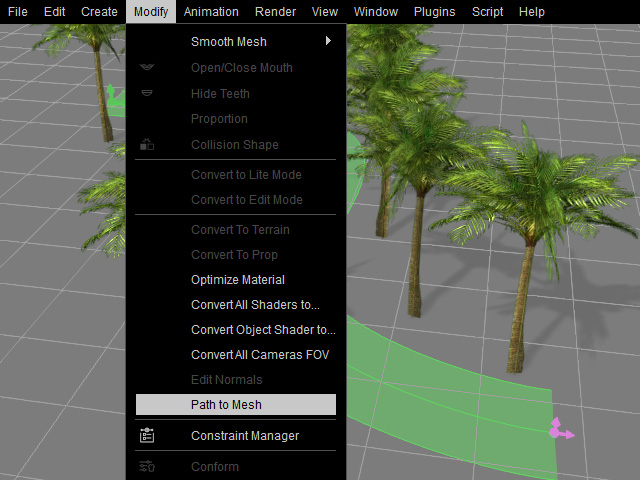
The
Path to Mesh panel will appear: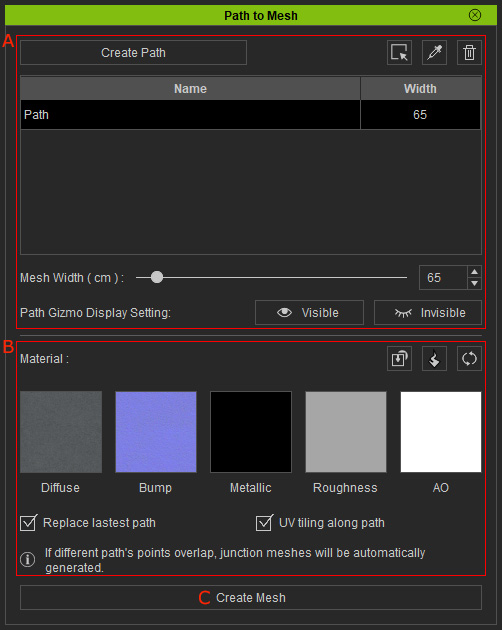
 A. Path Settings
- Adds or deletes paths into the list.
- Alters the width of the selected path in the list.
- Shows/hides the selected path in the viewport for better observation.
B. Material Setting
- Imports textures, materials or substance for the mesh.
- Repeatedly generates mesh or replaces the existing mesh.
- Projects the material on the z-axis or along the path flow.
C. Create Mesh
Creates a model based on the Path and Material settings.
