Fine Tuning Morph Strength
The ARKit Tuner maps 52 ARKit signals to a CC3+ character's default 75 morphs (or 160+ if using CC4 Extended morphs). You can adjust and correct the output generated by the ARKit Tuner with the Face Tuner Mapper, which builds upon this mapping allowing independent fine-tuning of each individual morph (from 75 to 160+).
Follow the steps below to fine tune the ARKit tuning results.
- Right-click on the empty area of the Speech graph, and select ACE-A2F > A2F Control > Face Tuner Mapper from the context menu.
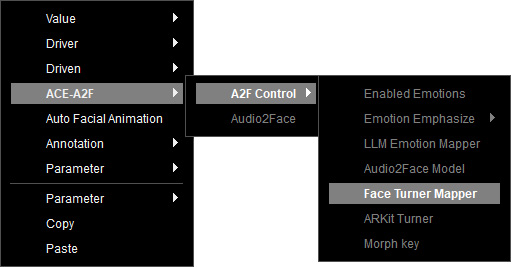
- The Face Tuner Mapper node is created.

- Select the node to show the available morphs on the character in the Parameters section.
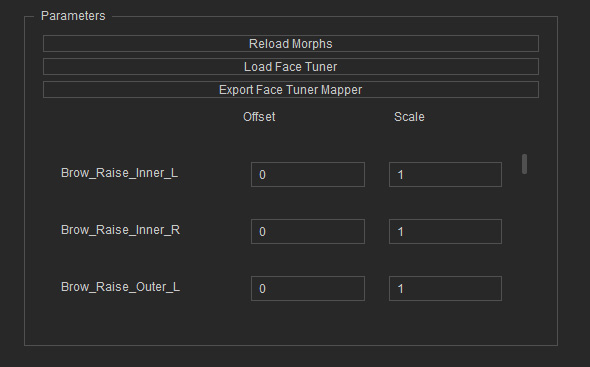
The tuning parameters include:- Offset: Adds or subtracts a fixed value from the ARKit Tuner’s output for precise result adjustments.
- Scale: Multiplies the output of the ARKit Tuner by a user-defined ratio to intensify or reduce the strength of each morph.
- Click on Export Face Tuner Mapper to save the tuning configurations as a preset in JSON format. You can then import the saved preset by clicking the Load Face Tuner Mapper button anytime.
- Connect the node to the Face Tuner Mapper input of the Audio2Face node.
- Enable and map the Emotions to the ones of LLM.
