Triggering Emotions
You can decide which of the 10 standardized emotions are allowed to be triggered during speech.
Follow the steps below to enable the emotions you wish the LLM to trigger.
- Right-click on the empty area of the Speech graph, and select ACE-A2F > A2F Control > LLM Emotion Mapper from the context menu.
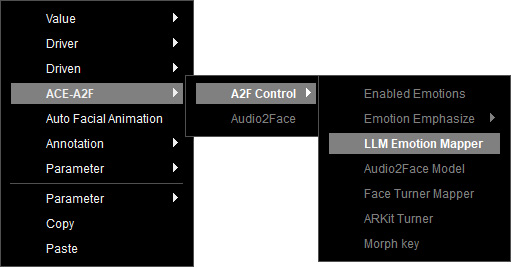
- The LLM Emotion Mapper node is created and provides the identical 11 Emotions with those of LLM.
You can customize the driven facial expressions triggered by these emotions.
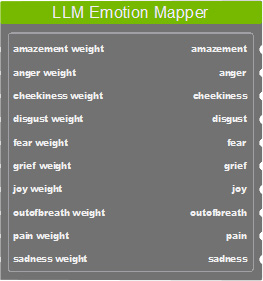
- Neutral
- Amazement
- Anger
- Cheekiness
- Disgust
- Fear
- Grief
- Joy
- Out of breath
- Pain
- Sadness
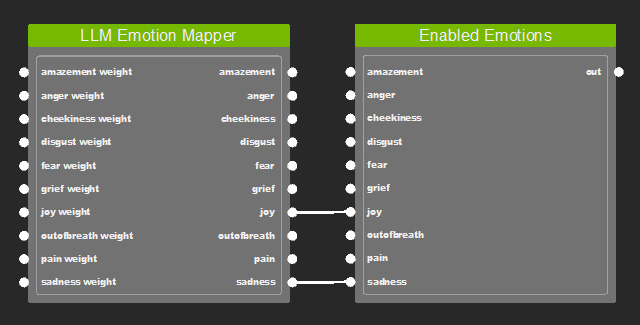
- Right-click on the empty area of the graph, and select ACE-A2F > A2F Control > Enabled Emotions from the context menu.
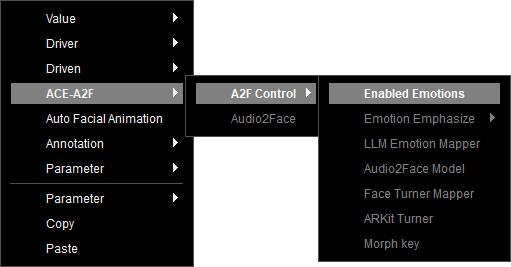
- The Enabled Emotions node is created and lists a total of 11 Emotions can be triggered by LLM.
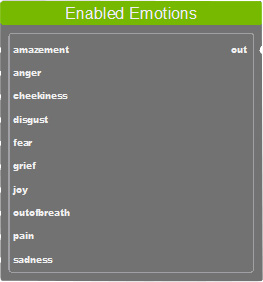
* You can rename emotion tags or disable unwanted tags in the LLM Asset.
* If the sentence does not contain a Mood tag, or the LLM does not support prompt conditioning, the default emotion will be neutral. - Determine which emotion can be triggered by connecting the mapped emotion on the LLM Emotion Mapper node to the target emotion of the Enabled Emotions node.
- Connect the Enabled Emotions node to the namesake input of the Audio2Face node.
- Next, design the driven emotions using strength levels.
