Launching Speech Graph
Open the Speech Graph by clicking the Speech Graph → button in the Behavior Tree panel. Alternatively, click the Speech Graph button while editing the Speech Gen related nodes in the Parameters section.
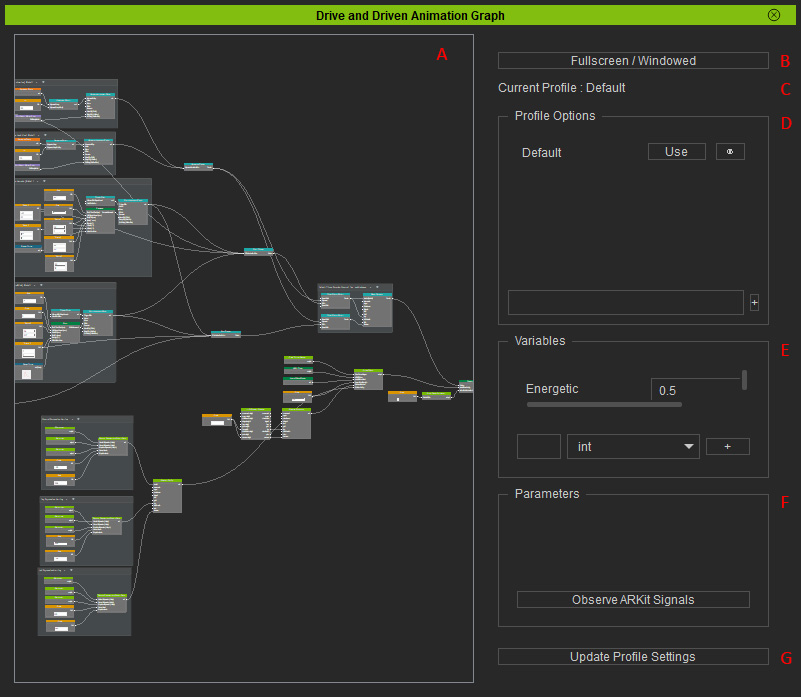
-
 Node Canvas
The editing canvas used to design and organize logic nodes for speech profiles.
Node Canvas
The editing canvas used to design and organize logic nodes for speech profiles. -
Fullscreen / Windowed
Toggles full-screen mode.
-
Current Profile
Displays the graph currently being edited.
-
Profile Options
Manages the speech profiles.
- Creates profiles.
- Switches to a specific profile.
- Renames, duplicates, and deletes profiles.
- Imports or exports profiles (*.speak).
-
Variables
Manages editable parameters. When designing a facial animation with linear interpolation, create the required control parameters in this section.
- Creates variables in the specified parameter properties. * Only a float is used to control the weight of linear interpolation.
- Deletes variables.
- Sets an initial value for a specific parameter.
-
Parameters
Displays controllable options for a selected node in this section to configure its parameters.
-
Update Profile Settings
Applies changes made to the current profile instantly.
