Saving and Loading Joint Statuses
In the Body Rig and Hand Rig steps, the joints are masked and repositioned for creating and removing bones. ActorCore AccuRIG provides features to save these adjustments (a.k.a. AccuRIG Data) into an INI file that can be loaded for similar models to save time.
Saving AccuRIG Data
If the joints statuses (locations, masks) are satisfactory, you can save them in INI format.
- Position and mask the joints in the Body Rig step, and reposition the joints in the Hand Rig step.
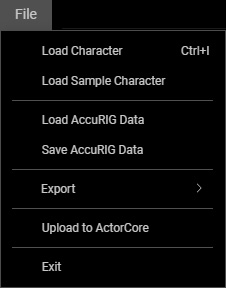
- Execute the File > Save AccuRIG Data... command.
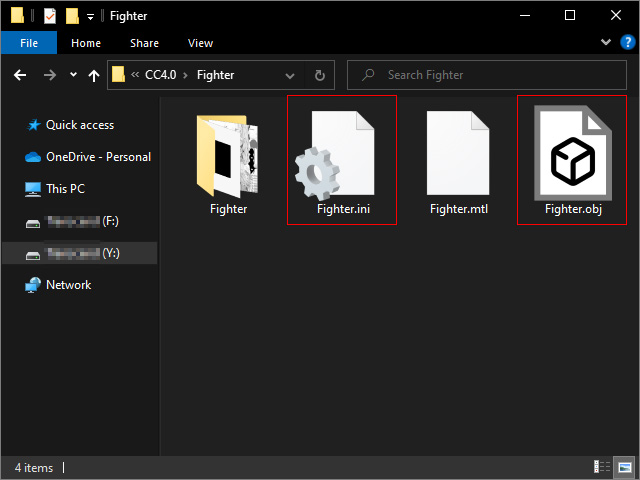
- Save the data to an INI file. Saving the INI where
the original model is stored is recommended.
 Note:
Note:
Since this feature saves all joints statuses for the body and fingers, if you execute this command in the Body Rig step without correctly positioning the finger joints, then the incorrect data for the finger joints will be saved as well.
Loading AccuRIG Data
If an AccuRIG Data file was saved, then you can load the file for the same model at step 2, 3 and 4.
- Loading in Check Model step: You can load the file from the xxxx field in the Modify panel.
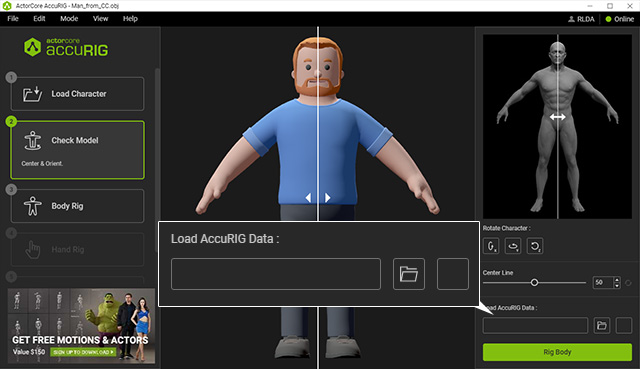
After the file is loaded, the joint statuses can only be seen in the Body Rig and Hand Rig steps. - Loading in Body Rig or Hand Rig step: In these two steps, you can load the INI file from the File > Load AccuRIG Data...
menu command.
