


Project Toolbar
The Project toolbar is used to create a new project, open a
saved project, save the current project, preview the export result, render
the project and show the mini view port.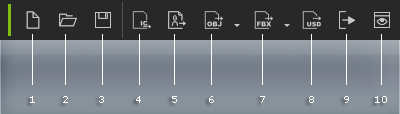
|
1 |
New Project (Ctrl + N) |
Creates a new project. |
|
2 |
Open Project (Ctrl + O) |
Opens a saved project. |
|
3 |
Save Project (Ctrl + S) |
Saves the current project to a target directory. |
|
4 |
Send to iClone |
Directly sends the current selected object to IClone without having to save it as a FBX file or character file in advance. If no object is selected, the current character in the scene will be sent automatically. |
|
5 |
Export iAvatar |
Saves the current character to a character file in *.iAvatar format. |
|
6 |
Export OBJ |
Exports the content as a file in OBJ format.
|
|
7 |
Exports the content as a file in FBX format.
|
|
|
8 |
Export USD (Omniverse) |
Export the Character as a file in USD format for further use in Omniverse. |
|
9 |
Render |
Renders the project in different image formats, such as Bmp, Jpg, Tga and Png. |
|
10 |
Current Frame Preview |
Previews the current frame as a still image. |
