REFINE MESH Step
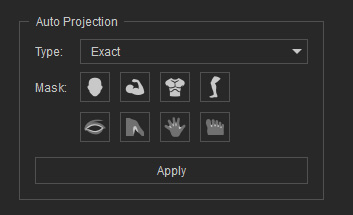
The REFINE MESH step is the final phase of the character conversion workflow. Using the alignment points established in Step 2, the system automatically warps and fits the underlying CC5 HD Neutral mesh surface to match the exact contours of your imported model. You can then use built-in editing tools to manually polish and fine-tune surface details. 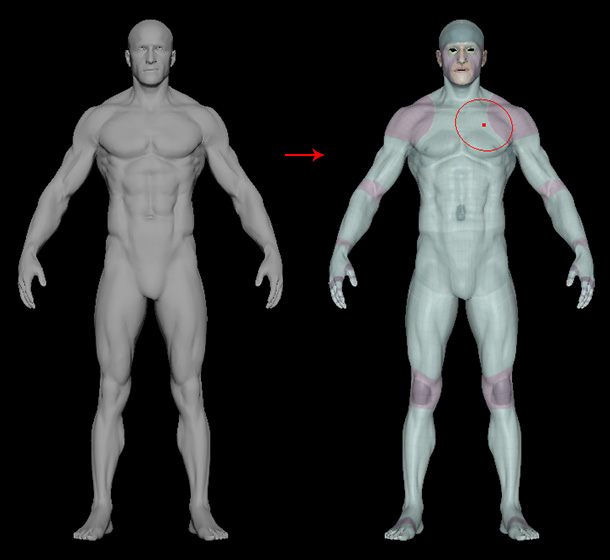
Click CREATE CC ACTOR to bake the deformed topology into a fully rigged, CC5 HD compatible character ready for texturing, animation, and export.
Key Features
- Automated Surface Fitting: Morphs the topology of the CC5 HD Neutral character to match the target mesh volume and silhouette.
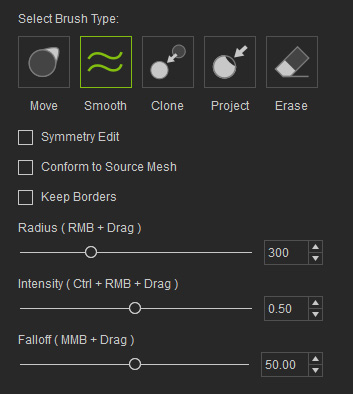
- Manual Sculpting & Editing Tools: Provides fine-tuning brushes to adjust local surface elevation and smooth out topology artifacts.
 Tip
Tip
Use the Project Surface Brush on complex areas like ears, fingers, or sharp armor components to instantly snap CC5 HD vertices to the original mesh geometry.
