Replacing Facial Texture
The Replace Facial Texture function allows users to update the source image used for texture generation without repeating the full character generation process. This provides a faster workflow for refining or improving skin textures while preserving the existing head model and adjustments.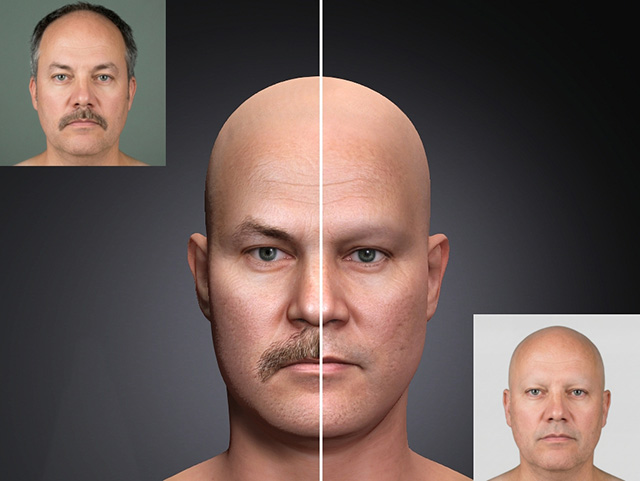
For accurate replacement, the position of facial features must remain exactly the same.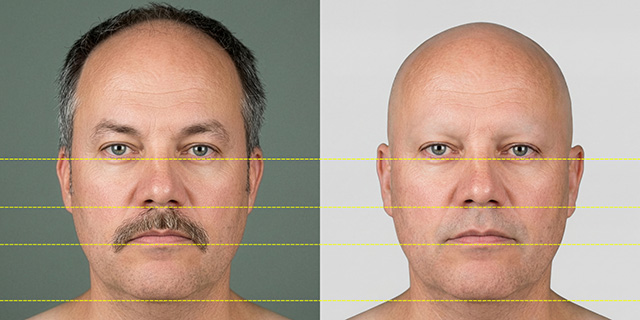
To ensure proper alignment, always use the cropped image provided in this panel together with the image handling tools on the side.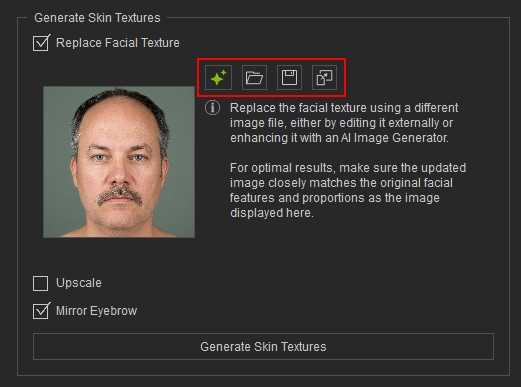
The replacement image must be based on the original cropped source image. Do not use a different character or an unrelated image, as mismatched facial structure and proportions will result in incorrect texture projection.
Only apply modifications, enhancements, or refinements to the provided cropped image while preserving its original alignment and composition.
There are two supported methods for modifying the source image:
