Writing Prompts for AI Decal Generation
When no reference images are available, prompt texting becomes essential. ComfyUI uses both positive and negative prompts to guide the AI in generating the desired decals.
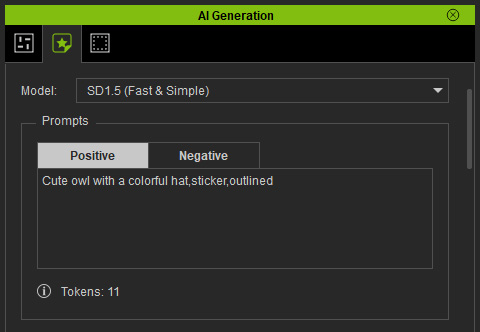
- Positive Prompt: Specifies the decal features or details to emphasize, such as “vintage logo,” “metallic badge,” or “bright enamel colors".
Use parentheses () in Stable Diffusion to weight specific features.
- For stronger emphasis, use (word:1.3).
- For weaker emphasis, use (word:0.8).
Guideline
Instructions / Examples
Single Subject
Focus on a single subject.
- Each prompt should describe only one patch, one badge, or one illustration.
- Avoid combining multiple unrelated elements to ensure clean asset generation and consistent training results.
“What It Is” + View
Start with “What It Is” + “Angle of View”.
- A rectangular embroidered patch, top-down
- Front view of a brushed metal nameplate, no angle
- Flat graffiti-style lettering graphic
Text in Quotes
Enclose all text in quotation marks.
- letters "USA"
- text "Aaron | Product Manager"
- arched text "CALIFORNIA EST 90"
Style Keywords
Use style / design keywords, not narratives.
- collegiate style
- vintage outdoor brand style
- classic American advertisement style
- vintage speed shop apparel graphic style
Colors
Keep color descriptions simple and direct.
- red / white / blue palette
- three colors: red, black, tan
- two colors: deep navy, cream
Materials & Craft Details
Specify concrete materials and craft details.
- Embroidery: tight stitching, satin stitching, straight stitch outline
- Leather: fine leather grain, gold foil stamped text
- Illustration: soft pencil texture, halftone dots, crayon doodle style
- Metal: brushed metal, engraved text, subtle linear grain, corner screws
Background
Define the Background Clearly (Asset-Oriented).
- transparent background
- plain background
- light cream background (print-style)
- Negative Prompt: Specifies unwanted elements, such as “blurry edges”, “incorrect proportions”, or “low contrast”, to prevent undesired artifacts. This field is pre-filled with default terms such as error, blurry, cropped, worst quality, low quality, normal quality, jpeg artifacts, signature, watermark, username, outline, etc.
Select the desired AI model from the drop-down list, and then use both positive and negative prompts together to help the AI generate clear, accurate, and visually consistent decals with SD1.5, SDXL, and Qwen, as illustrated in the table below.

AI Model | AI Output | Positive Prompt | Negative Prompt |
SD1.5 |  | (kawaii cat:1.3), sticker, stickers, cute, colorful, outlined, flat design | error, blurry, jpeg artifacts, cropped, worst quality, low quality, normal quality, jpeg artifacts, signature, watermark, username, outline |
 | (retro badge logo:1.3), circle emblem, bold outline, minimal, vector art | ||
SDXL |  | A simple, adorable cartoon white cat sitting upright, looking at the viewer. It has black outlines and minimal details. Cute, sticker art, vector illustration, white background. | |
 | (retro badge logo:1.3), circle emblem, bold outline, minimal, vector art | ||
Qwen | Embroidery | ||
 | A shield-shaped embroidered patch, vintage design, featuring the number "96" in the center with banner text "VINTAGE", three colors: red, black, and tan, tight satin stitching, straight stitch outline, top-down, transparent background, precise replica style. | ||
 | Vintage embroidered patch, bold number “1987” with black outline. Curved bottom ribbon saying “IRON RIDERS”. Thick stitching, textured thread. | ||
| Name Tags | |||
 | A rectangular PVC soft rubber badge, front-facing, no angle, raised lettering “Aaron / Motion Designer”, glossy highlights, smooth silicone-like texture, bold outline border, transparent background. | ||
 | Front view of a luxury leather fashion label, Italian vegetable-tanned leather, gold foil stamped text on the left: “Aaron", gold foil stamped text on the right:| Reallusion Creative Director”. Flat view with no angle, no shadows, elegant spacing, high-end brand aesthetic, extremely realistic, transparent background. | ||
 | Front view of a rectangular brushed metal industrial nameplate, flat design, no perspective, clean technical layout. Engraved text: “Aaron | Engineering Team”. Subtle linear texture, screw heads on the corners, neutral lighting, extremely realistic, transparent background, suitable for apparel labels. | ||
| Flat Art | |||
 | Flat graffiti-style lettering graphic, texting "FREEDOM" with arrows and splash marks. | ||
 | A detailed illustration print, featuring arched text "CALIFORNIA EST 90", and the bottom with the small banner text "Enjoy your life", two colors: deep navy and cream, front view, neutral lighting, vintage coastal lifestyle print style, transparent background. | ||
 | A high-quality illustration print, featuring bold red script typography "CLASSIC DRIVE" over smaller text "CO.", with red checkered flag borders above and below, distressed texture, front view, light cream background, vintage speed shop apparel graphic style. | ||
| Metal Ornament | |||
 | Cross-shaped metallic piece with intricate floral carvings, baroque ornament style, symmetrical, plain background, centered, concept art | ||
 | Single metallic wing piece, embossed feather detail, highly detailed, symmetrical, gothic style ornament, plain background, centered, no human, concept art, positive light | ||
Additional reference images can be used to guide and control the decal style.
Discovering Design Inspiration
Browse for references on material websites, such as Rawpixel, to gather ideas and inspiration for your designs.
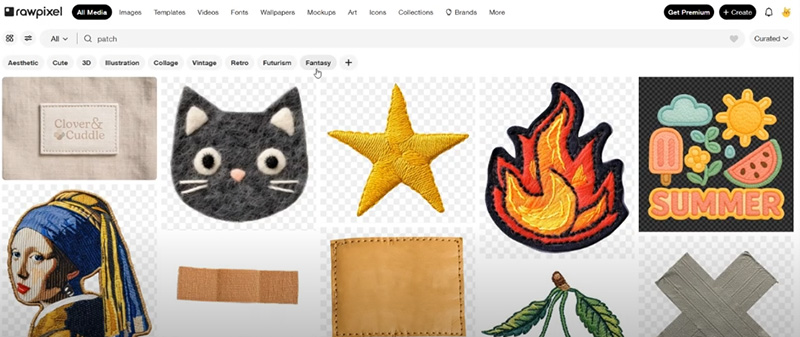
Then, drag the desired image onto the Stable Diffusion 1.5 - Cheat Sheet website to extract its metadata.
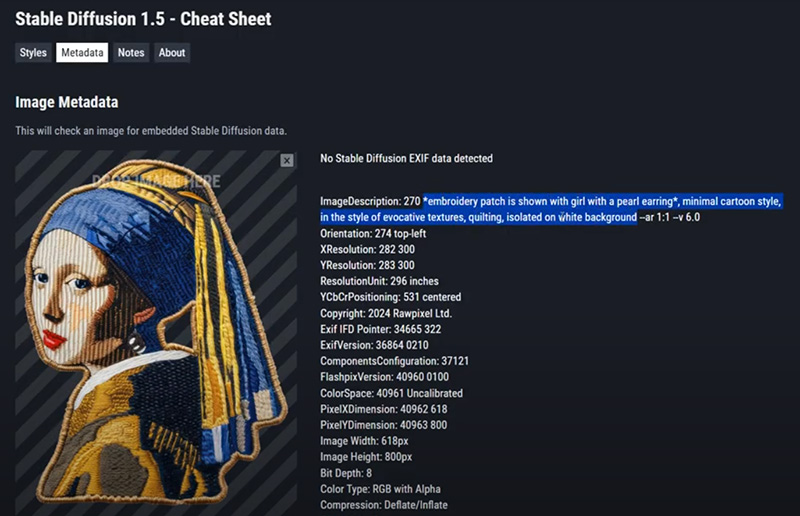
The extracted metadata can be used as the positive prompt for generating decals in FashionGen.
