Writing Prompts for AI Pattern Generation
When no reference images are available, prompting plays a critical role. ComfyUI uses both positive and negative prompts to guide the AI in generating the desired patterns.
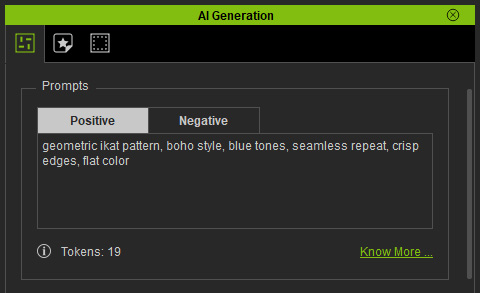
- Positive Prompt: Specifies the elements and styles you want the AI to include in the generated image (e.g., "flowers", "embroidery", "high-quality"). You can provide a reference image of the desired output and instruct the LLM to generate a Stable Diffusion 1.5 prompt based on the image, while keeping it under 30 words. Ensure the prompt contains the necessary details; otherwise, the resulting images will tend toward realistic photographs.
- Negative Prompt: Specifies elements or features to exclude from the generated image (e.g., "blurry," "low-quality," "cropped"). This helps prevent unwanted artifacts and ensures cleaner results. By default, this field is pre-filled with undesirable qualities like: error, blurry, cropped, worst quality, low quality, normal quality, JPEG artifacts, signature, watermark, and username.
Using both positive and negative prompts together helps the AI generate more accurate, visually consistent, and high-quality images for specific patterns, as illustrated in the examples below.
AI Output | Positive Prompt | Negative Prompt |
 | flower | watermark, text, error, blurry, jpeg artifacts, cropped, worst quality, low quality, normal quality, jpeg artifacts, signature, watermark, username |
 | flower print, pattern | |
 | yellow flower print, pattern | |
 | Chaotic yet harmonious ink spray pattern, fractal-like splashes, high-energy droplets fading into soft ink clouds, atmospheric depth, minimal color monochrome palette | |
 | Delicate baroque floral embroidery pattern, monochrome tone-on-tone design, elegant minimal ornament | |
 | seamless medieval armor pattern, ornate floral engraving, baroque metallic ornament, embossed texture, symmetrical design, intricate detail, silver steel surface, high contrast, 4k, PBR ready | |
 | Medieval armor trim sheet, seamless decorative border, intricate metal engraving, gold and silver inlay, high detail, sharp lines, symmetrical design, embossed texture, realistic material, PBR ready, dark background, game asset, 4k | |
 | A luxurious Japanese-inspired pattern combining Wagara motifs with artistic brush strokes and gold foil accents, featuring wave, chrysanthemum, and geometric flower patterns, intricate symmetry, traditional-meets-modern style, indigo and gold color scheme, textured silk background, seamless 4K texture. | |
 | Create a bold abstract pattern inspired by the Memphis Group style. Use thick black squiggly lines, zigzags, loops, and geometric shapes on a light background. The composition should be playful, energetic, and visually striking, with a hand-drawn or doodle-like texture. | |
 | A simple flat vector pattern featuring four flat vector leaves. bold outlines, clean shapes, pastel color palette, hand-drawn feeling, seamless textile print, minimalist and aesthetic, no shading, no gradients | |
 | A simple flat vector pattern featuring three cute abstract mountains. No more than five elements, bold outlines, clean shapes, pastel color palette, hand-drawn feeling, seamless textile print, minimalist and aesthetic, no shading, no gradients | |
 | A simple flat vector pattern featuring four geometric shapes (circle, square, triangle, star). No more than five elements, bold outlines, clean shapes, pastel color palette, hand-drawn feeling, seamless textile print, minimalist and aesthetic, no shading, no gradients | |
 | A simple pattern featuring five wavy lines and squiggles. No more than five elements, bold outlines, clean shapes, pastel color palette, hand-drawn feeling, seamless textile print, minimalist and aesthetic, no shading, no gradients |
You can use additional reference images to guide texture distribution or generate motifs.
