


Render Panel
You can access the Render commands from the main menu bar to display the Render panel.
Alternatively, you can click the Render button on the
Project toolbar.
button on the
Project toolbar.
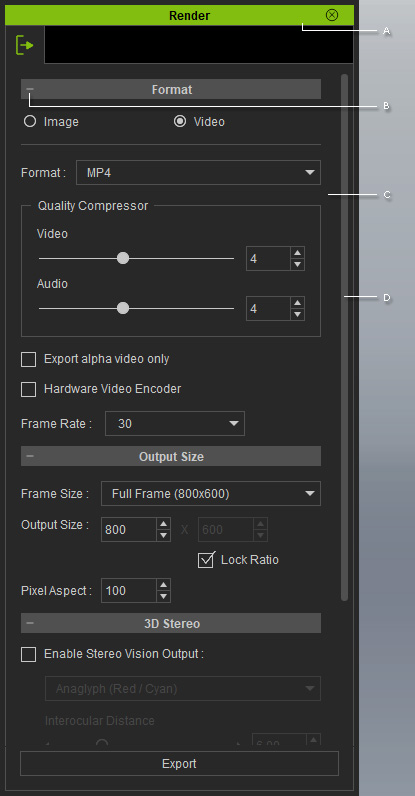
 A
A
Double-click on the title bar to dock the panel to the docking place, or undock the panel and make it float above the main program.
B
There are sections included in the panel.
You may expand or collapse each section by clicking the
+/- symbol.
- Format section: Decides the format of the exported media.
- Output Size section: Specifies the resolution for the output frame.
- 3D Stereo section: Exports your project as 3D stereo media.
- Panorama section: Exports your project as 360 degrees panorama videos.
- Render Quality section: Determines the render quality of the exported media.
- Output Range section: Specifies the frame range for rendering.
C
The adjustable parameters associated with the rendering results.
D
There is a scroll-bar at the right of the panel. Click and hold the mouse down anywhere on it and drag up/down to navigate the whole panel when it is longer than one page. Alternatively, you can roll the mouse wheel to scroll it up/down.
