The User Interface Introduction of Sky Prop Tool
You will see a panel shows after you apply a Sky Prop Tool from the Content Manager.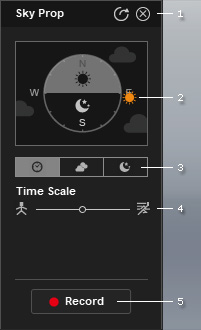
If you close the panel and want to reopen it, select the object in the Scene Manager, then right-click on the viewport and choose Script > Control Menu from the context menu.
|
1 |
Panel Control |
|
|
2 |
Time Clock |
The sun icon auto-moves around the clock to determine the time of the day. |
|
3 |
Setting Tabs |
The sky elements are divided into three tabs, including the Time, Cloud and Night settings. |
|
4 |
Settings |
It displays different settings for different sky elements. |
|
5 |
Record |
Click this button to start recording animations, in accordance with the settings, for the sky objects as the time goes by. Click again to stop recording. |
 : To close the panel.
  : To make the panel floating on the screen or to be confined within the preview window.