Selecting Lip-Sync Model
The ACE A2F (Audio2Face) system uses AI to simulate lip muscle movements that correspond to various sounds, letting the character speak with accurate lip-sync animation.
Follow the steps below to choose an appropriate Lip-Synce model for your character.
- Right-click on the empty area of the Speech graph, and select ACE-A2F > A2F Control > Audio2Face Model from the context menu.
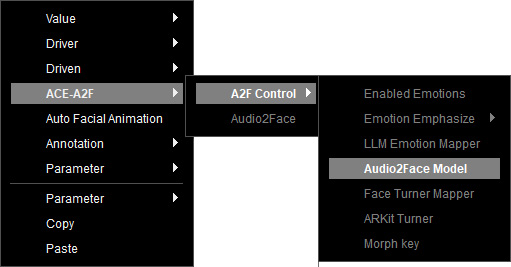
- The Audio2Face Model node is created.

- Select the node, and choose a base AI model for the current Speak profile from the drop-down list of the Parameters section.
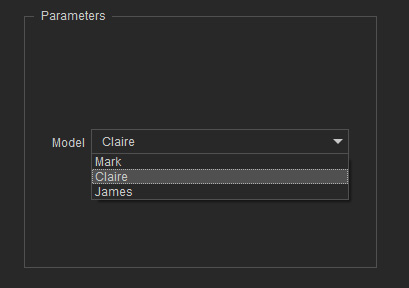
The available model options include:- Mark: Imitates the mouth movement of an adult Caucasian male during speech.
- Claire: Imitates the mouth movement of an adult Asian female during speech.
- James: Imitates the mouth movement of an adult African male during speech.
- Connect the node to the Audio2Face Model input of the Audio2Face node.
- The lip-sync strength for mouth animation generated from ARKit signal is 1.25 by default, can be modified with a Float or Lerp node linking to the Lower Face Strength input of the Audio2Face node.
For example, create a Lerp node from the context menu Value > Lerp > Lerp to control the strength from ARKit signal.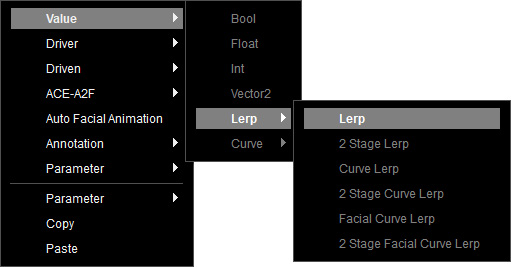
The Lerp node provides 2 input ports: min and max for two different ranges, input from the Float or Vector2 node.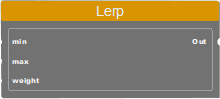
It requires a parameter node to control the weight for output. You can create one by right-clicking on the empty area of the graph, and selecting Parameter > Create New from the context menu.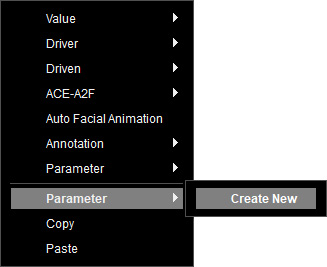
Name the new parameter and choose the "float" type. Click on OK.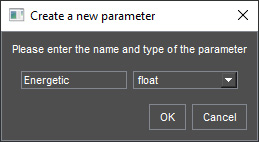
Select this node to set a value ranging from 0 to 1 in the Variables section, to perform linear interpolation between the values from min and max. Once executed, the interpolated result value between the two inputs is computed and sent to the connected nodes.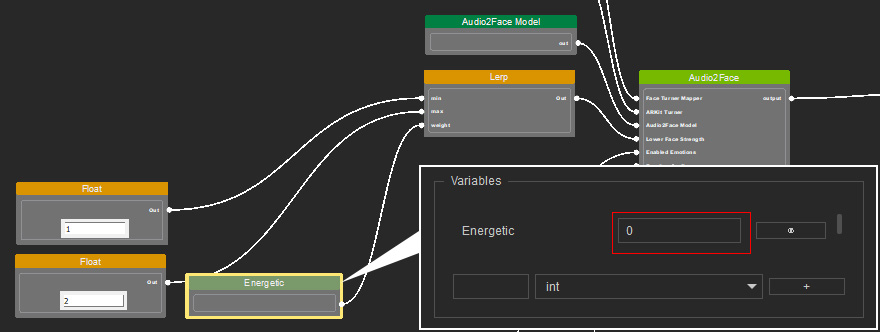
- If the value is set to 0, the result equals min.
- If the value is set to 0.5, the result is the average of min and max.
- If the value is set to 1, the result equals max.
- Next, optimize the received ARKit signal and adjust the morph strength.
