Previewing Source Video
You can preview the imported source video with the Edit Video panel.
- After importing a single video, the Edit Video panel will automatically appear with the video clip loaded.
- Alternatively, select a video and click the Edit button on the Video Mocap panel to manually open the Edit Video panel.
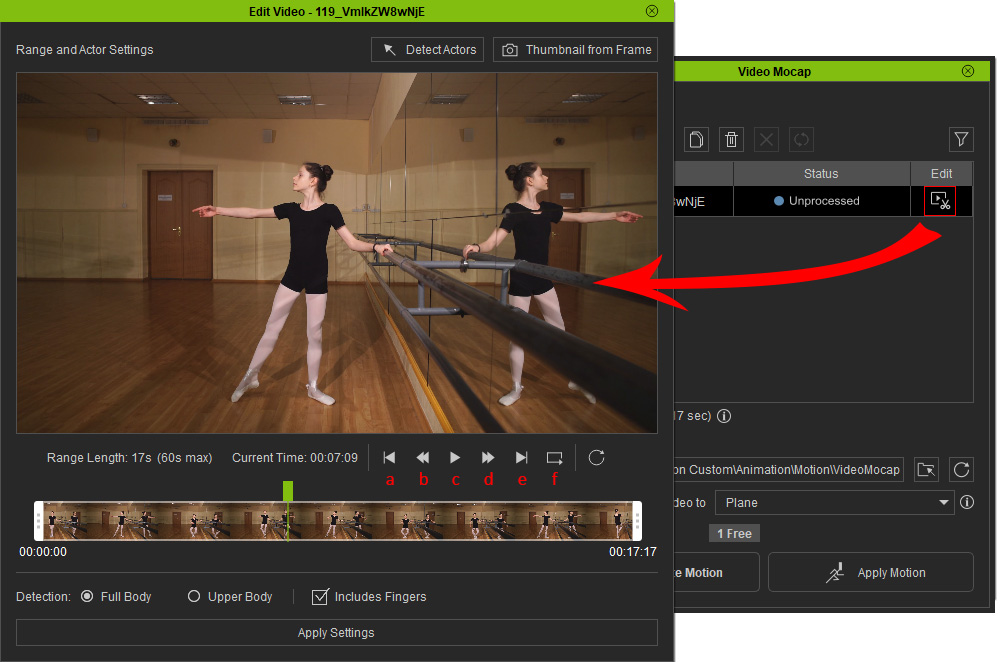
The playback controls below the preview let you to scrub the timeline.
Commands | Shortcuts | Action | |
a | Start | , (Comma) | Skip the playhead to the beginning of the playback range. |
b | Previous | ← (Left) | Go one frame back. |
c | Play / Pause | Space | Start the playback or pause it. |
d | Next | → (Right) | Go one frame forward. |
e | End | . (Period) | Skip the playhead to the end of the playback range. |
f | Loop | Toggle the playback loop on or off. |
*The video of a completed task (with "Applicable" status) can only be played back for the processed portion.
