Video Mocap Panel
The Video Mocap panel displays the videos queued for motion generation for later applications on the characters in the scene.
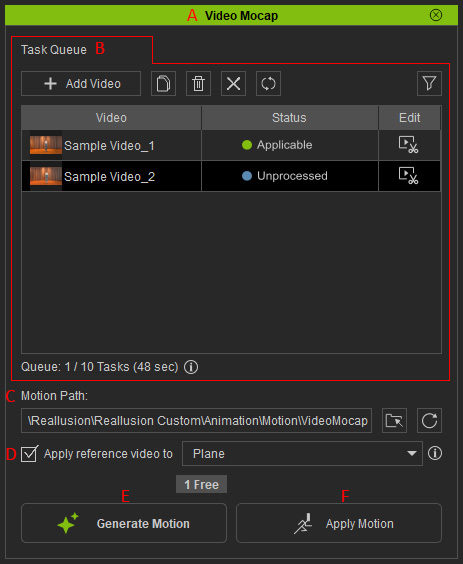
- Dock / Undock: Double-click on the caption to dock the panel to the docking area or undock the panel and make it float above the main window.
- Task Queue: Lists the queued tasks, indicates task status, and can be used to launch the video editor.
- Motion Path: Displays the storage path for the rlMotions converted from videos. Clicks on the path to open the file explorer directed at the default folder.
- Apply reference video to: Determines whether to generate the source video as a comparison for the generated motion when applying motion.
- Generate Motion: Confirms the fee payable and starts the video conversion process (Available only when tasks with “Trimmed” or “Unprocessed” status are selected).
- Apply Motion: Applies the selected task motion (converted rlMotion from video) to a character (Available only when tasks with "Applicable" status are selected).
