Generating Motion
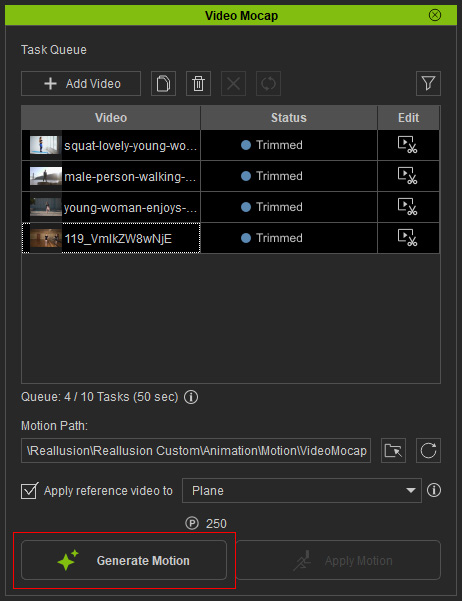
After the processing region is determined, you can upload tasks for motion generation in the Video Mocap panel.
Motion generation is charged at 5 AI / Bonus / DA Points per second (100 points = US$1.00). Each task can process up to 60 seconds of video and extract motion for one character.
- If the video exceeds 60 seconds, trim it using the processing region before submission.
- If the video contains multiple people, you can duplicate the task and submit separate motion-generation tasks for each person in a batch. Each batch supports up to 10 tasks.
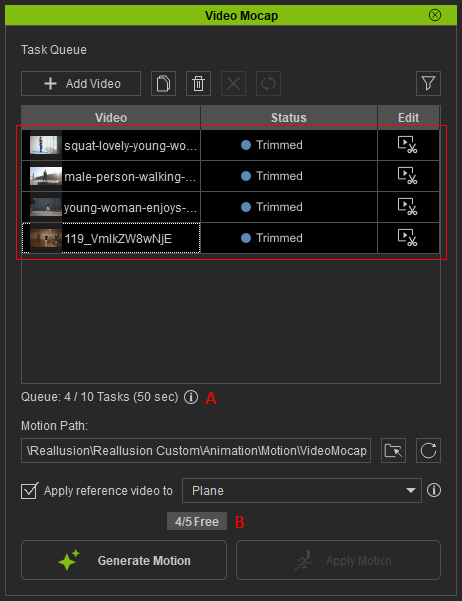
Before clicking Generate Motion, select the target videos, confirm the total seconds shown below the task list (A), and review the task price (B) displayed above the button.
Using Coupons
Available coupons are used first, followed by AI / Bonus / DA Points. Each fully licensed iClone user receives one free Video Mocap generation. Additional coupons may also be offered through Reallusion promotional campaigns. One task consumes one coupon regardless of video length (up to 60 seconds).
Using AI / Bonus / DA Points
Your available points are shown near the top-right corner of iClone.
Click the down-arrow button to view the remaining balance for each point type, or click the Get More Points button to purchase additional DA Points for more submissions.
Charges are deducted in order from AI Points, Bonus Points, and then DA Points.

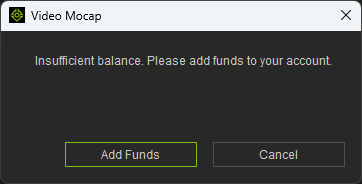
If your balance is insufficient, a notification will appear.
Click Add Funds to top up your DA Points, or Cancel to return.
After adding credits, click the Refresh  button to update the point display near the top-right corner of iClone and verify the new balance.
Then click Generate Motion again to begin the motion generation process.
You can monitor task progress and results directly from the task status.
button to update the point display near the top-right corner of iClone and verify the new balance.
Then click Generate Motion again to begin the motion generation process.
You can monitor task progress and results directly from the task status.