Calibrate Step
In the Calibrate step, you can exam the characterization by applying poses or motions to the character and also fine-tune the angles of the bones to prevent mesh penetration.
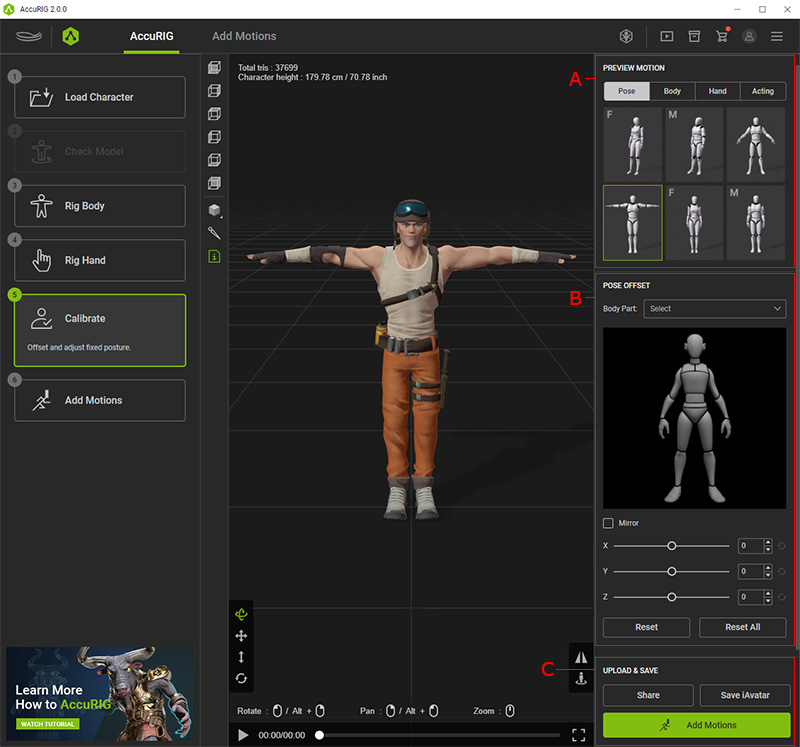
 A. Select Preview Motion
- Click on the thumbnails to apply poses and motions to the characterized model.
- You can also browse the ActorCore Motion libraries at the final Add Motions step to find additional motions for third-party applications.
B. Pose Offset
The settings in this section can fine-tune the bone orientations to prevent penetration between the limbs and body.
C. Upload and Save
- Share: Uploads the rigged model to share on ActorCore.
- Save iAvatar: Exports the native format for Character Creator and iClone.
