Main Menu - Mode
The Mode menu on the main menu bar contains commands related to the
character, props and terrain, or the constraint for rigid bodies.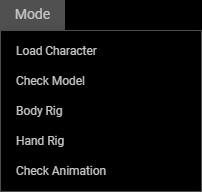
 Load Character...
Imports an FBX or OBJ file with mesh model to start creating a new character.
Check Model
Rectifies the model's direction and sets the center line. Refer to the Check Model Step section for more information.
Body Rig
Proceeds to the third step, Body Rig, for locating the body joints for auto rigging procedure.
Hand Rig
Goes to the fourth step, Hand Rig, for relocating the finger joints and the directions of the thumbs.
Check Animation
Switches to the final step and apply motions to the auto-rigged character to check out the result. Also, modify the bones' directions.
