


Using the Voice Recorder
Cartoon Animator provides a sound recorder that can record voice from various audio sources.
This audio can then be used as part of a talking message and as a script to animate models.
The voice recorder can record sounds from various audio devices such as
a microphones, phone lines, CD players, audio-in lines, or any other auxiliary input devices connected to your PC.
( Watch Tutorial - Lip Sync Basics )
- Select a character with the Sprite-based or Morph-based head.
-
Click the
 Create Script button on the Functional Toolbar.
-
Click the Record Voice button to record sound.
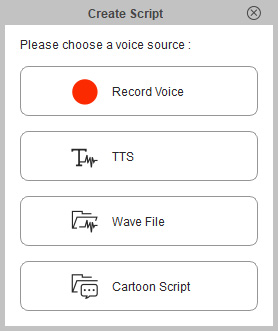
-
The sound recorder will then open.
Follow the ensuing steps to create an audio script.
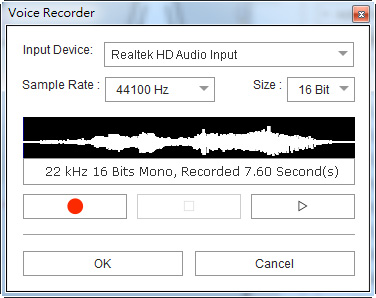
- Select the source for sound recording from the Input Device drop-down list.
- Click the Record button to start recording. Recording from the specified input device will then start.
- Click the Stop button to stop recording sound.
- Click the Play button to play back the recording.
-
If you are satisfied with the results, then click the OK button.
If not, then press the Record button to record again.
 Note:The maximum length of a sound recording is 30 minutes.
 -
Modify the voice clip and lip synching keys in the Face tracks on the Timeline (F3).
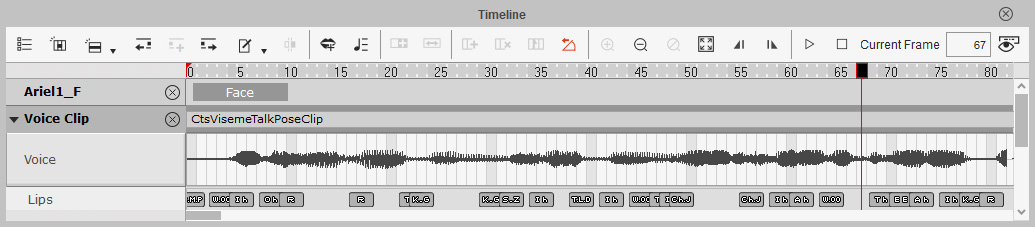
Refer to the following sections for more information:
