User Interface Introduction for Quad Remesher (New for v5.2)
|
A |
|
|
|
B |
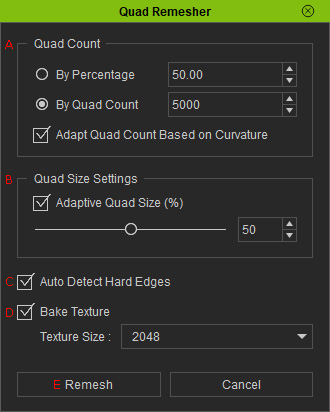
Adaptive Quad Size (%): Controls the size variation of quads between flatter and more curved areas. |
|
|
C |
Detects hard edges in the original mesh and uses them to guide the remeshed topology. |
|
|
D |
Bakes the original model's textures onto the remeshed model. |
|
|
E |
Remesh |
After adjusting the settings, click Remesh to generate the new mesh. If the result is not satisfactory, adjust the settings and try again. |
