


Visual Settings Panel
The Visual Settings Panel contains adjustable parameters belonging to each object.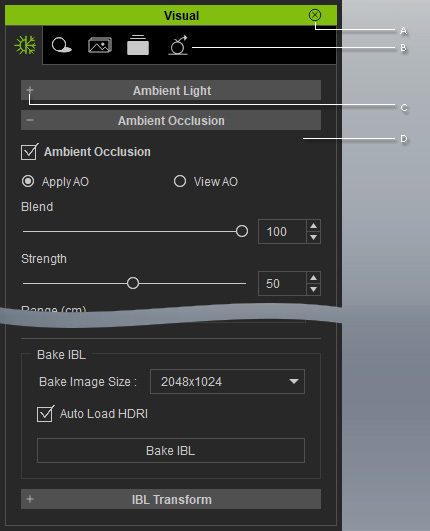
 A
A
Double-click on the title bar to dock the panel to the docking place, or undock the panel and make it float above the main program.
B
This panel includes feature tabs. You may switch tabs to enrich the visual effects to the project.
- Atmosphere tab: To change the ambient light, activate the Ambient Occlusion, Fog, HDR (High Dynamic Range) and IBL (Image Based Lighting) effects.
- Shadow Map tab: To turn the shadow effect On/Off on the objects.
- Toon Shader tab: To toggle the Toon Shader effect On/Off for the project.
- Visual tab: To modify the Effect templates that are currently applied to the project.
- GI tab: For enabling and adjusting the GI effect for the entire project.
C
You can expand or collapse each section by clicking the +/- symbol.
D
The adjustable parameters associated with the objects in the current project. You may set parameter values for all the objects in the 3D viewer.
