What are the Simulation settings (New for v. 8.4)
The settings under the Simulation section in the Character Settings tab are Retarget, Snap to Surface, Lock Feet, NavMesh Effect and Agent Radius. You can adjust these settings on one or more characters at once.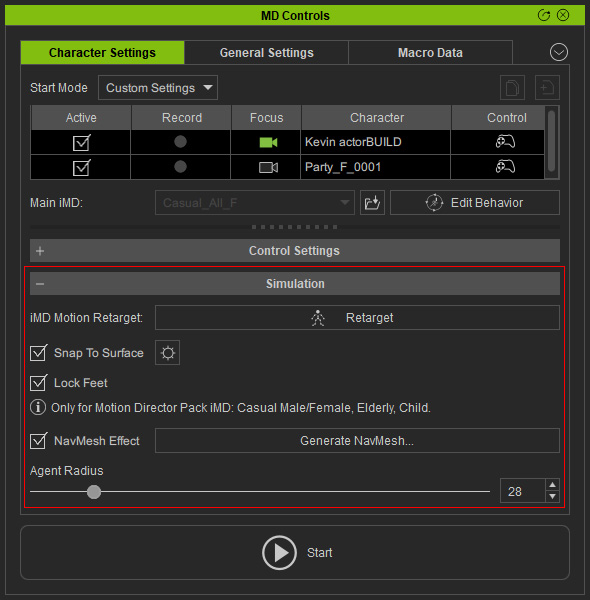
- Retarget: If there's significant variation in character sizes, especially with custom humanoids, applying embedded iMDs may cause issues like foot-sliding or limb-penetrations. To fix this problem, simply click the Retarget button.
- Snap to Surface: Unlike the foot contact setting for each character, Snap to Surface compels the characters to move on the upward surfaces of props and terrains as in the real world, even if the surfaces is underneath the floor level. You can click the gear button for the detail settings.
- Lock Feet: This function combats foot sliding using a motion correction technology. Motion correction is only implemented for certain iMD files, specifically those designated as "Casual Male", "Casual Female", "Elderly", and "Child" in the "Motion Director" pack.
- NavMesh Effect: NavMesh demarcates the range in which characters can traverse. Click the Generate NavMesh... button to create one.
- Agent Radius: The Agent Radius is used to determine the collision size that triggers avoidance of obstacles (including other actors), while in motion.
