MD Behavior - Behavior Settings (New in version 8.5)
Under Behavior Settings of the MD Behavior
panel (Ctrl + F6), you can edit behavior
motions, including adding, deleting, or adjusting them in the Timeline.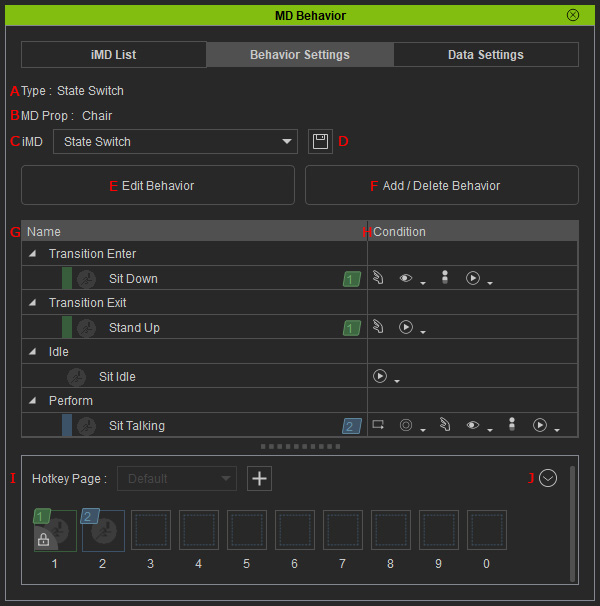
- Type: Displays the type of the selected MD prop.
- MD prop: Displays the name of the selected MD prop.
- iMD drop-down list: You can use the drop-down list to switch to different iMD data for editing the integrated behavior motions.
- Save Current iMD: Saves the iMD data for further usage, you can then apply the save iMD file to other characters with the same settings and behaviors.
- Edit Behavior: Activates or deactivates the behavior items.
- Add / Delete Behavior: Enters the mode for adding, deleting or adjusting the behavior motions.
- Behavior List: Displays all enlisted behaviors in the current iMD.
- Condition: You can use the controls in the Condition column to set status for the behavior motions.
- Hotkey Page: Displays the hotkeys. You can also add hotkey pages, add, delete, move the hotkeys.
- Hotkey Settings: Adjust the hotkeys with the drop-down list commands.
