Animation Triggers
You can find all available animation triggers in the Drive and driven Animation Graph, and use the Driver Priority Policy node to determine the priority order.
There are four types of animation triggers in the AI Assistant system.
Right-click on the empty area of the graph, and select Driver > Driver Node from the context menu to find them.
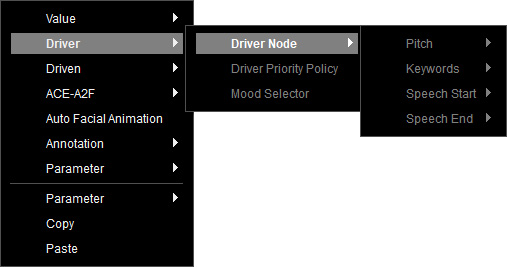
- Speech Start: Triggers animation at the start of speech.
- Speech End: Triggers animation at the end of speech (upon detecting punctuation like ., !, ?).
- Keywords: Triggers animation when specific words or phrases are spoken.
- Pitch: Triggers animation based on detected pitch variations in the audio.
After inputting the driven animations, right-click on the empty area of the graph, and select Driver > Driver Priority Policy from the context menu.
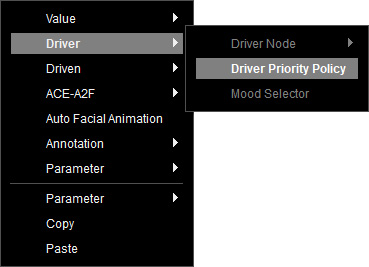
A Driver Priority Policy node is created.
It integrates all driver nodes and sorts them with a default priority order: Speech Start > Keywords > Pitch > Speech End.
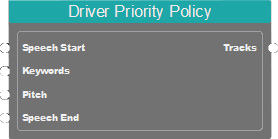
Higher-priority drivers (listed at the top) output their driven results first.
The output of a lower-priority driver that overlaps with a higher-priority one is not allowed.
You can select this node to adjust the order in the Parameters section.
Drag these drivers in the list to rearrange the priority order.
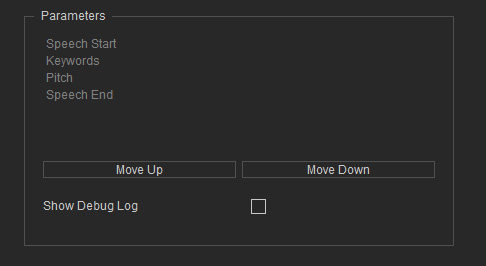
Alternatively, select a trigger and click on Move Up or Move Down to shift the order.
When the priority order is done, link the Driver Priority Policy node to a Mood Selector or directly to the Speech Root.
- Speech Root: Bypasses the Mood Tags generated by the LLM.
- Mood Selector: Links to single or multiple emotions to share results.
