Animation Triggers - Speech Start Trigger
The Speech Start Trigger node triggers animation at the first frame of audio playback when the LLM-generated text or script text is processed by TTS (Text to Speech) and converted into a .wav file for playback.
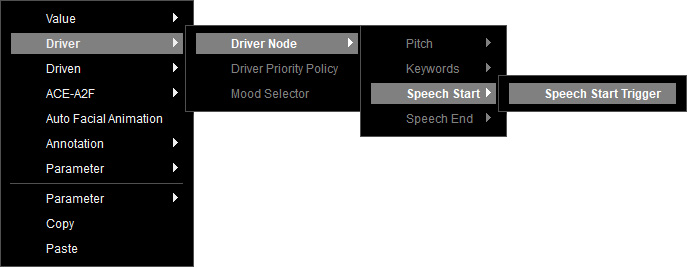
Right-click on the empty area of the Speech Graph, and select Driver > Driver Node > Speech Start > Speech Start Trigger to show the available driven animations in the node.
You can connect this node to driven animation sources, including the head, brow, blink, saccade, and clip animations.
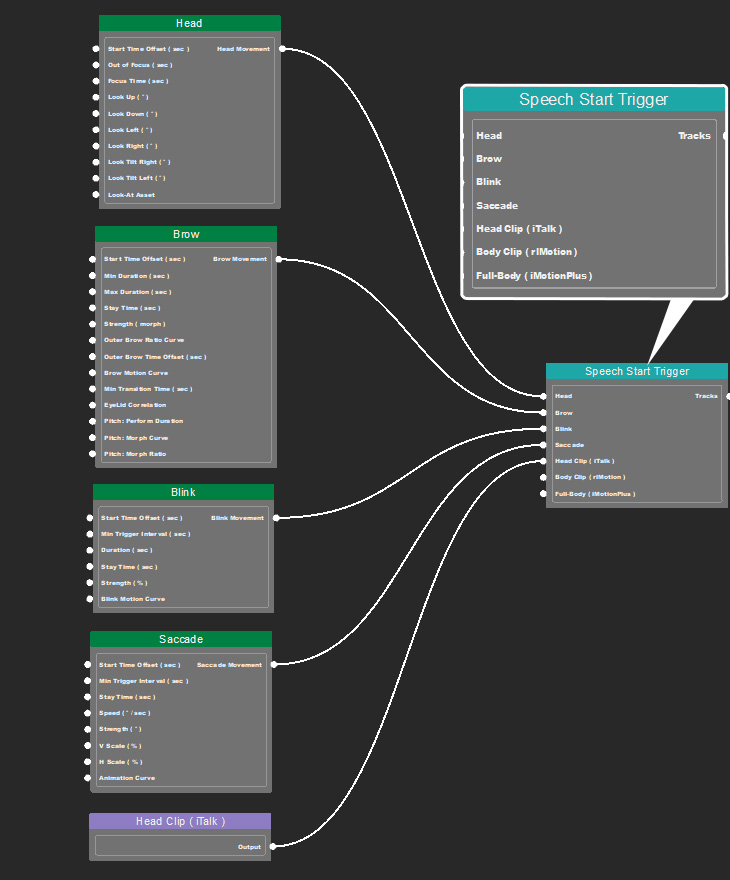
Refer to the following sections for more information on each driven animation node.
- Saccade: Contains parameters to control Saccade animation.
- Blink: Contains parameters to control Blink animation.
- Brow: Contains parameters to control Brow animation.
- Head: Contains parameters to control Head animation.
- Clip Animation:
- Head Clip: Contains facial animation clips (.iTalk).
- Body Clip: Contains body animation clips (.rlMotion).
- Full-Body: Contains combined face & body animation clips (.iMotionPlus).
Make sure the data is properly set for the driven nodes and insert additional nodes in the following situations (before linking the Speech Start Trigger node to the Speech Root).
- When multiple drivers exist, link all the drivers to a Driver Priority Policy node for priority setting.
- If the character responses require mood analysis based on text content for mood-driven animation, use a Mood Selector to connect between the driver node and Speech Root.
